Connect Four in Python (1/6) — grid spec and 6×7 data structure
Build the 6×7 list-of-lists grid, VIDE/J1/J2 constants, grille_pleine — downloadable puissance4_chapitre_01.py, Connect Four series, October 2026.

Build the 6×7 list-of-lists grid, VIDE/J1/J2 constants, grille_pleine — downloadable puissance4_chapitre_01.py, Connect Four series, October 2026.

AI-generated illustration
Some links below are affiliate links. Amazon.ca is the default shop; an Amazon.ca link is included for US readers. Check today’s price — we do not invent local amounts.
Direct answer (October 2026) — You lay the foundation of Connect Four in Python 3: a 6×7 grid as a list of lists, constants (VIDE, J1, J2) and grille_pleine to detect a future draw. No pretty display yet: you work in a terminal (text window where you run python filename.py). Download puissance4_chapitre_01.py below; next step is chapter 2 — display and gravity.
Connect Four series (6 parts) — Hub · 1 — grid (this page) · 2 — display · 3 — turns · 4 — four in a row · 5 — draw · 6 — complete game
| Item | Detail |
|---|---|
| Goal | Constants, nouvelle_grille(), grille_pleine() |
| Level | Beginner (after lists and Python basics) |
| Time | 30–45 min (read + copy or download) |
| You need | PC with Python 3 (free interpreter) |
| Prerequisites | Python course, especially lists & strings and if/else |
| Success check | Script creates an empty grid, stacks three tokens in one column, reports not full |
Connect Four ( Puissance 4 in French) uses a vertical board: two players drop tokens into columns; each token falls to the lowest free slot. First to align four tokens (horizontal, vertical or diagonal) wins. A full board with no winner is a draw.
This chapter only prepares the data structure reused in parts 2–6. If you finished the terminal “higher or lower” mini-game, you already know the terminal; here you add a 2D grid (rows and columns).
Open a terminal in your project folder:
py puissance4_chapitre_01.py if python fails.python3 if needed.Python 3 runs your file; print() shows text. No robot or electronics — keyboard and code only.
| Constant | Value | Role |
|---|---|---|
LIGNES |
6 | Rows (top → bottom) |
COLONNES |
7 | Columns (left → right) |
VIDE |
0 | Empty cell |
J1 |
1 | Player 1 (X later) |
J2 |
2 | Player 2 (O) |
Indices (zero-based, standard in Python):
col_demo = 3.nouvelle_grille()A list of lists: each row holds COLONNES cells set to VIDE.
def nouvelle_grille():
    return [[VIDE for _ in range(COLONNES)] for _ in range(LIGNES)]
Refresh lists & strings if nested lists are new; loops matter in later chapters.
grille_pleine()When no column accepts a token, the top row (grille[0]) has no VIDE left.
def grille_pleine(grille):
    return all(grille[0][c] != VIDE for c in range(COLONNES))
Used fully in chapter 5.
Same as puissance4_chapitre_01.py (function names and user strings stay in French on disk).
#!/usr/bin/env python3
# -*- coding: utf-8 -*-
"""Connect Four — Chapter 1/6: constants, 6x7 grid, demo stack in one column."""

VIDE = 0
J1 = 1
J2 = 2
LIGNES = 6
COLONNES = 7


def nouvelle_grille():
    return [[VIDE for _ in range(COLONNES)] for _ in range(LIGNES)]


def grille_pleine(grille):
    return all(grille[0][c] != VIDE for c in range(COLONNES))


if __name__ == "__main__":
    g = nouvelle_grille()
    print("Grille", LIGNES, "x", COLONNES, "creee.")
    assert len(g) == LIGNES and len(g[0]) == COLONNES
    col_demo = 3
    for _ in range(3):
        for ligne in range(LIGNES - 1, -1, -1):
            if g[ligne][col_demo] == VIDE:
                g[ligne][col_demo] = J1
                break
    print("Derniere ligne (bas de la grille) :", g[-1])
    print("Grille pleine ?", grille_pleine(g))
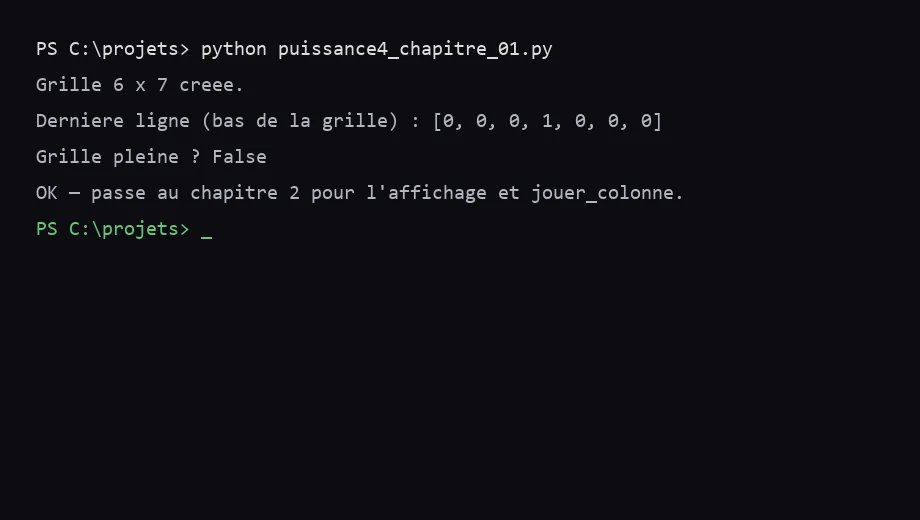
print("OK — passe au chapitre 2 pour l'affichage et jouer_colonne.").py file.python puissance4_chapitre_01.py.1 at index 3 (three stacked tokens in that column), Grille pleine ? False, OK line.No traceback should appear. Failed assert means wrong LIGNES / COLONNES.
| Symptom | Likely cause | Fix |
|---|---|---|
python not found |
Not on PATH | Reinstall Python 3 with “Add to PATH”, or py on Windows |
SyntaxError |
Broken copy-paste | Download the official .py |
IndentationError |
Tabs vs spaces | Use 4 spaces per block |
| Bottom row all zeros | Demo loop missing | Keep the for _ in range(3) double loop |
grille_pleine True on new grid |
Inverted test | Top row must still contain 0 |
g = nouvelle_grille(), what are len(g) and len(g[0])? Answer: 6 and 7.J2 from the bottom; what are g[5][0] and g[4][0]? Answer: both 2.grille_pleine(nouvelle_grille())? Answer: False.Other text games: Hangman hub, Battleship hub. Series finale: chapter 6 — full game.
puissance4_chapitre_01.py — run from its folder with python puissance4_chapitre_01.py.
Chapter 2 — display and gravity shows the board in ASCII in the terminal.
Books on Python game projects may inspire follow-ups — verify edition and level before buying.
Emmanuel Sauvage — updated 31 October 2026.
Torn between two models or stuck on a build? Drop us a line and we will get back to you by email.