mBot vs mBot2: differences and which one to choose
Makeblock mBot vs mBot2 compared: mCore vs CyberPi board, sensors, encoder motors, Wi-Fi, Python, chassis and accessories. A clear table and a recommendation by age and project.

Makeblock mBot vs mBot2 compared: mCore vs CyberPi board, sensors, encoder motors, Wi-Fi, Python, chassis and accessories. A clear table and a recommendation by age and project.
Some links on this page are affiliate links. Check today’s price on the product page.
Last updated 17 November 2026.
Direct answer (November 2026) — Choose mBot for a first Scratch / mBlock robot on a tighter budget (mCore, AA batteries, RJ25 sensors). Choose mBot2 if you want Python, the CyberPi screen, Wi-Fi, a Li-ion battery and encoder motors. RJ25 accessories from the classic mBot do not plug into mBot2 — use mBuild modules instead.
The mBot and the mBot2 are two generations of Makeblock’s classroom robot. Both are programmed with mBlock (Scratch-style blocks), but the mBot2 is built around the more powerful CyberPi board, with Wi-Fi and a natural path to Python. Specs below come from Makeblock’s mBot2 introduction (mBot 1.1 vs mBot2 spec table). Always check the official product page before buying: kit revisions differ (Bluetooth module included or not, chassis colour, bundled parts). Deeper on CyberPi alone: CyberPi overview.
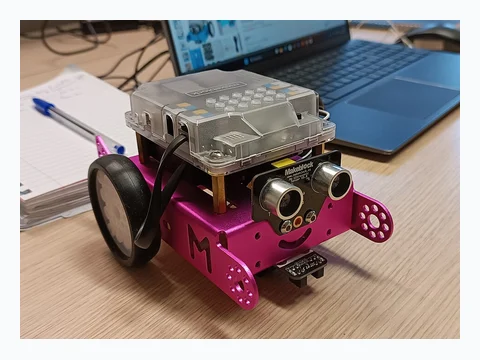

| mBot (classic) | mBot2 | |
|---|---|---|
| Board | mCore (Arduino-compatible) | CyberPi (more powerful, Wi-Fi) |
| Programming | mBlock blocks; Arduino C for advanced users | mBlock blocks + Python built in |
| Motors | two DC motors | encoder motors (precise moves) |
| Typical sensors | line follower, ultrasonic, IR (depending on kit) | ultrasonic, line follower, light, gyroscope |
| Display / sound | RGB LEDs, buzzer | 1.44" colour screen (128 × 128) on CyberPi, speaker and microphone |
| Connectivity | Bluetooth or 2.4G depending on pack | Bluetooth and Wi-Fi |
| Chassis | aluminium alloy | aluminium alloy |
| Power | battery pack (AA cells, depending on kit) | built-in 2,500 mAh rechargeable battery, USB-C |
| Best for | first robot, clubs, tight budget | ages 10+, longer projects, moving to Python |
Our pick: the mBot as a first robot on a budget; the mBot2 if you want several years of use and a smooth move from blocks to Python without buying another robot.
First program on classic mBot: first mBot program. LEGO comparison: mBot vs LEGO robot.
mBot (classic) uses RJ25 ports and Makeblock’s older add-on ecosystem: extra sensors, arms, tracks, spare parts. The most common mistake is buying an add-on without checking it matches your mBot revision.
mBot2 relies on mBuild modules for CyberPi. Stick to Makeblock’s official compatibility list rather than mixing generations, and wait until the basics are mastered before spending on extras.
| Extension type | mBot classic (RJ25) | mBot2 (mBuild / CyberPi) |
|---|---|---|
| Historic RJ25 sensors | Yes (ports 1–4) | No (without adapter) |
| mBuild magnetic modules | No | Yes |
| Tracks / explorer packs | Check Makeblock sheet (often v1 line) | mBot2 / mBuild kits |
Bluetooth issues? mBlock Bluetooth troubleshooting.
Still comparing brands? See our programmable robot guide and mBot vs Codey Rocky. All our comparisons are in the Comparisons section.
Amazon partner — commission possible on eligible purchases.
No — mBot2 uses mBuild on CyberPi. See the accessory table above.
Often mBot. mBot2 if you already target Python — best robot for 8.
If you only use basic blocks short term, the gap feels small at first. It pays off for Python, screen, gyro, battery and encoder motors.
Best programmable robot, mBot vs LEGO, or LEGO SPIKE alternatives.
Torn between two models or stuck on a build? Drop us a line and we will get back to you by email.