Best Python programmable robot: a complete 2026 guide
Python on a robot in 2026: mBot2, CyberPi, or Raspberry Pi 5. Ages, projects, editors, and euro prices from the 6 November 2026 Amazon.ca reading.

Python on a robot in 2026: mBot2, CyberPi, or Raspberry Pi 5. Ages, projects, editors, and euro prices from the 6 November 2026 Amazon.ca reading.

AI-generated illustration
Disclosure: This guide includes Amazon affiliate links. As an Amazon Associate we earn from qualifying purchases, at no extra cost to you.
Best Python pick
Advanced projects
Scratch to Python
| Model | Age | Languages | Indicative price | Highlights | Where to buy |
|---|---|---|---|---|---|
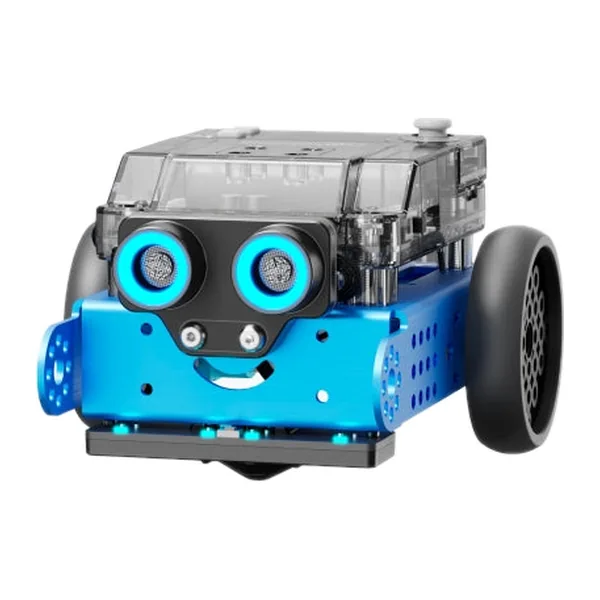
 Makeblock mBot2 Best Python pick | 10–14 years | Scratch, Python | See today's price | CyberPi with colour screen • Python and Scratch | |
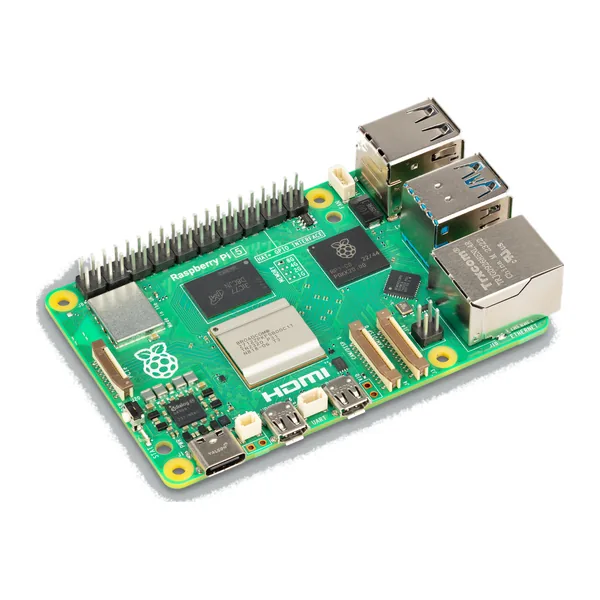
 Raspberry Pi 5 (8GB) Advanced projects | 12+ years | Python, C++, JavaScript | See today's price | 8 GB RAM for vision & Docker • Huge maker community | |
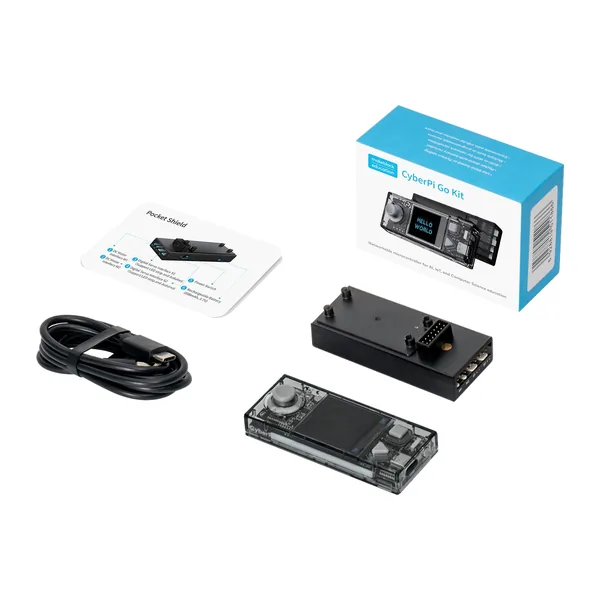
 Makeblock CyberPi Scratch to Python | 10+ ans | Scratch, Python | See today's price | Carte programmable polyvalente • Écran LED intégré |
Python reads almost like a sentence, and it shows up again in high school, in further study, and in a lot of software jobs. On a robot, a loop or a condition does not stay in the console: the motor turns, the LED lights, or the robot stops in front of the wall. It is the right language when a child has already seen blocks, or when they will write text with someone beside them.
Three machines cover the essentials, with prices from typical Amazon.ca listings. The figures are euros, not converted dollar prices. The mBot2, at around CA$185, carries the CyberPi board and moves from blocks to Python without loose wiring. The CyberPi board alone, at around CA$65, suits someone who already has a chassis, or who only wants the screen, Wi-Fi, and sensors. The Raspberry Pi 5 8GB, at around CA$231 runs the Python of scientific libraries, at the cost of a power supply, a microSD card, and a case that are not in this reading. None of these three prices is a “project budget”: books, extra sensors, and a chassis for the Pi are checked separately. The buttons on this page open today’s listing.
Python’s syntax can be read aloud, and the libraries save you from rewriting everything. A child coming out of Scratch already knows variables, loops, and conditions. They lose drag-and-drop, and they gain text close to what people write later. That text is reused in high-school computer science, then in computing degrees, without the robot being required for what comes next.
On the day the program does not do what you planned, the documentation on docs.python.org and the forums answer most beginner errors. That is not a manufacturer hotline. For age, and for the move from Scratch to Arduino or Python, the landmark on this site is when to start.
| Age | Level | Robot that fits |
|---|---|---|
| 8–10 | End of Scratch, close adult help | CyberPi, mBot2 with mBlock Python |
| 11–13 | Some independence, and motivation | mBot2, Raspberry Pi with a robot kit |
| 14 and up | Long projects, AI or vision | Raspberry Pi 5, ESP32 and MicroPython |
Python in IDLE or in a code editor is drier than mBlock’s Python mode, where the blocks still sit next to the text. At 8–10, start in that mode, with an adult. At 11–13, the mBot2 fills a whole session. From 14, a Raspberry Pi or an ESP32 board in MicroPython opens longer projects. The guide robot at 10 and the one at 14 narrow the choice when age is the only criterion.
The mBot2 and the CyberPi run a simplified MicroPython. There is no system to install: mBlock sends the program in a few seconds, over USB or Wi-Fi. The editor shows the blocks and the text. You do not get the whole Python ecosystem of a computer, and that is exactly what makes the first sessions possible.
Other shopsVoir chez Makerfire
At around CA$185 on 6 November 2026, the mBot2 is the complete robot on this page: screen, microphone, speaker, Wi-Fi, and sensors already screwed on. mBuild extensions come later, at a price that is not in the reading. It is the choice from 10 to 14 when you want to see the robot drive on the day you open the box.
A Raspberry Pi or an ESP32 is not a robot. You connect motors and sensors, and you write the Python of the usual libraries, including image processing on the Pi. The freedom is paid for in cables, power, and assembly time. The Raspberry Pi 5 kit lists what has to sit around the board before it will boot.
Other shopsVoir chez SparkFun
The 8GB board was around CA$231 on 6 November 2026. It has the memory for a desktop, a camera, and a small detection model at the same time. That price is the board alone. An ESP32 in MicroPython costs less per board and draws little power, but it does not run the same libraries. Its price is not in this reading, so check the listing for the exact module. Do not infer it from the Pi.
mBlock, on the CyberPi, shows the block and the text that matches it. The child can go back to blocks on the day the text gets stuck. It is the least abrupt transition, as long as you accept the Makeblock environment rather than a Python you installed by hand.
Other shopsVoir chez SparkBlocks
At around CA$65 on 6 November 2026, the CyberPi alone has no wheels. It has a screen, Wi-Fi, and sensors, and you program it in blocks, then in Python. It completes a robot you already own, or it serves as a first connected object before you buy a chassis. The mBot2 stays simpler if the goal is a rolling base on the first afternoon.
Around 10–12, four ideas are enough for a year, without doing all of them in the same week. A line follower reads a sensor and corrects the two motors. Obstacle avoidance puts a condition on distance. A small onboard web page acts as a remote. A light show cycles through a list of colors. On mBot, sessions that are already written live in the classroom projects and the one-hour ideas. Adapt them at home.
Around 13–15, you can display a measurement and send it further: temperature on the CyberPi screen, or a station on a Raspberry Pi with the BME280 build. Face tracking needs a camera and OpenCV, so the Pi rather than the mBot2. A voice command or an autonomous maze stretches the same base, without changing machines.
From 16, the projects change in kind: mapping, object detection with a small model, several robots that talk to each other, or an arm whose path you calculate. The Pi 5 8GB is the board on this page with the memory for that. This guide does not describe how to build those projects. It only says which machine can carry them.
mBlock 5, at mblock.cc, targets the mBot2 and the CyberPi. The interface shows the blocks and the text, the robot’s functions are already there, and you can send the program over Wi-Fi. It is the starting point until the child asks for a general-purpose editor.
Thonny comes preinstalled on Raspberry Pi OS, in the language of the system. It is enough for the first Python files, with a simple debugger, and it also talks to an ESP32 in MicroPython. The site thonny.org is there if you install it on the computer at home.
Visual Studio Code, at code.visualstudio.com, takes over when the project has several files, a Git repository, or a notebook. It is the tool for long projects, not the one for the first session on an mBot2.
Free courses that hold up are the Python path from France IOI, the introductory course on OpenClassrooms, and the documentation on docs.python.org (the French edition if you want it, the English edition as the source vocabulary). Real Python and Stack Overflow are in English, useful as soon as the question goes beyond the robot. French-language channels (Graven, Docstring, FormationVidéo) show the syntax on screen. Children’s books exist. No edition is in the price reading: there is no buy link here, so this page does not send you to a vague search.
| Criterion | Python | Scratch | Arduino in C |
|---|---|---|---|
| Readability | Very good | Very good | Average |
| Range of projects | Very wide | Limited to blocks | Decent |
| Getting started | Moderate | The gentlest | The steepest |
| AI and data | The most at home | Very limited | Very limited |
| Onboard electronics | Possible, through MicroPython or a Pi | Very limited | The most direct |
| After middle school | Still useful | You move on | Useful in electronics |
Scratch stays the right start until about 10, then it blocks projects that do not fit in blocks. Python is the compromise that still reads clearly and that continues after the robot. Arduino in C is the path when the subject becomes the sensor, the motor, and the board, more than the language. You can perfectly well do Scratch for two or three months, then open the mBot2’s Python mode, without treating C as an obligation.
No. It helps, because the loop and the condition are already there. A child who has never programmed gets through more easily with a few weeks of blocks, in mBlock, before the text. If they are already comfortable with a keyboard and they are 12 or older, Python mode can be the first contact, with an adult on the first syntax error.
The mBot2, at around CA$185 on 6 November 2026, or the CyberPi alone at around CA$65 if wheels are not the subject. Both keep the blocks within reach. A Raspberry Pi at that age is a good choice only if someone at home will install the system and wire it.
The Pi runs a full Python, a desktop, and a camera. The 8GB board in this reading is around CA$231 accessories on top. The ESP32 runs MicroPython, runs on a battery, and costs less as a board, but its price is not in this reading: check the listing for the exact module. It does not replace the Pi on the day the project opens a real vision library.
Take the Raspberry Pi 5 8GB board, at around CA$231 on 6 November 2026, then a camera whose price you check separately. It is the only one of the three machines in this guide with the memory for a small detection model. The mBot2 remains the right robot for learning Python. It is not the platform for a vision project.
The choice fits in one sentence. To see a robot drive in Python without assembling a board, the mBot2 at around CA$185. For the same environment without the wheels, the CyberPi at around CA$65. For the libraries and the camera, the Pi 5 8GB at around CA$231 knowing that the board alone does not boot. All three amounts date from 6 November 2026 and may have moved on the listing.
Torn between two models or stuck on a build? Drop us a line and we will get back to you by email.