ESPHome OTA updates without a cable
Update an ESP32 over Wi-Fi with ESPHome: OTA option, password, Home Assistant, safe mode and fixes.

Update an ESP32 over Wi-Fi with ESPHome: OTA option, password, Home Assistant, safe mode and fixes.
OTA stands for “Over The Air”: updating the program of an ESP32, a small electronic board with Wi-Fi, over the wireless network, without unplugging it from the wall or carrying it back to the computer to plug in a USB cable. For a sensor fixed in a ceiling void, a wall tablet or a solenoid valve in the garden, this is what makes maintenance practical: you edit your configuration file (the YAML) from your armchair, and the board updates itself.
Expected result: a new YAML version installed without a cable, and a recovery procedure if something goes wrong. Time: 10 minutes. Difficulty: beginner.
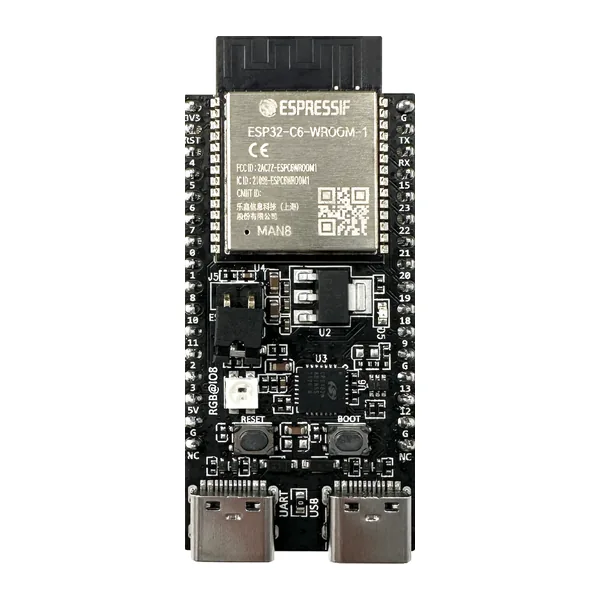
After the first USB flash, this ESP32-C6-DevKitC-1 stays where it is installed. Later program updates use the Wi-Fi path below, without going back to the UART port.
ota: block (first flash).The configurations on this site already contain this block:
ota:
  - platform: esphome
    password: !secret ota_password

wifi:
  ssid: !secret wifi_ssid
  password: !secret wifi_password
  ap:
    ssid: "my-device Fallback"
    password: !secret ap_password

captive_portal:
The password stops any other machine on the network from sending a program to your board. The ap and captive_portal blocks create a fallback Wi-Fi network if the board cannot find the usual one: see the recovery section.
On the command line, esphome run my-device.yaml offers the same choice and finds the device on the network.
Check: in the logs, the board reconnects to Wi-Fi then to Home Assistant. In Settings → Devices & services, the device’s ESPHome version is updated on its page.
The board can almost always be recovered without a cable:
ap_password password. The portal page lets you pick a network or upload a .bin file.| Symptom | Likely cause | Fix |
|---|---|---|
| “Error resolving IP address” | The .local name does not resolve (mDNS) |
Add use_address: 192.168.x.x under wifi: and reserve that IP in your router |
| Password refused | The password changed in the YAML | Reflash over USB once with the new password |
| Upload fails midway | Weak Wi-Fi signal | Move the board closer to the router, retry |
| Device “Offline” | Powered off or on another network | Check power and Wi-Fi |
| Compiles but nothing is sent | Firewall or VLAN between computer and board | Allow port 3232 between them |
Keep an OTA password, never expose it to the Internet (port 3232 must never be forwarded from your router) and store the API encryption key safely. Update ESPHome regularly: each release lists its changes in the changelog. After a version jump, read the breaking changes before reinstalling your devices.
Next: step-by-step ESP32 projects and GPIO wiring basics.
Board used in our ESPHome tutorials: Amazon.ca.
Can I update ESPHome without USB after the first flash?
Yes — keep the ota: block and password in YAML; compile from ESPHome or Home Assistant on the same Wi-Fi.
OTA upload keeps failing?
Check signal, reserve a fixed IP if mDNS fails, and never forward OTA port 3232 from your router.
Updated on 17 November 2026. Source: ESPHome documentation, OTA platform. Defaults may change between versions.
Torn between two models or stuck on a build? Drop us a line and we will get back to you by email.