An AI agent builds my Homey Advanced Flows with an API key
Hands-on: a Homey Pro mini API key given to a Grok AI agent, which creates an Advanced Flow from one sentence and controls the home by voice or by typed prompt.

Hands-on: a Homey Pro mini API key given to a Grok AI agent, which creates an Advanced Flow from one sentence and controls the home by voice or by typed prompt.
Also available in French.
Tested at home on 25 November 2026.
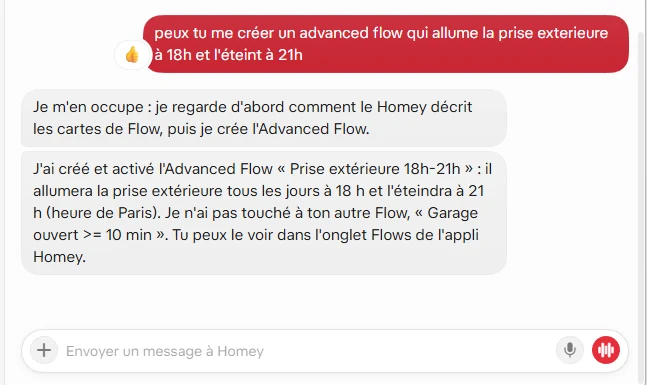
Tonight I did not open the Flow editor. I wrote one sentence to an AI agent: “can you create an advanced flow that turns the outdoor plug on at 6pm and off at 9pm” (I wrote it in French). A minute later the Advanced Flow existed, enabled, on my Homey Pro mini. Here is how it is wired, what I checked afterwards, and why I stay careful.
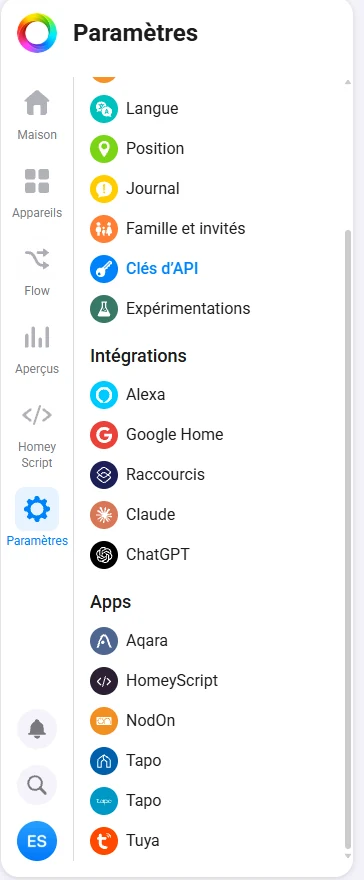
The same agent also controls the devices in the house: on my Homey, these are the Aqara, NodOn, Tapo, Tuya and HomeyScript apps. I talk to it by voice (the app’s microphone) or type a prompt.
Homey Pro exposes a Web API: the Homey app, Alexa and Google Assistant use it to control devices and start Flows. An API key is an access token you create yourself on your Homey so an outside tool can call that API.
According to Athom’s documentation, API keys are created on recent Homey Pro models (including Homey Pro mini); when you create one, you choose its permissions, it is shown only once, and it can be revoked at any time. One detail matters here: on the official forum, an Athom developer explains that OAuth Web API clients cannot get certain sensitive rights, such as creating Flows or Advanced Flows, and points to API keys created on your own Homey instead. That makes them the right tool for an agent that has to create automations.
Three rules I stick to:
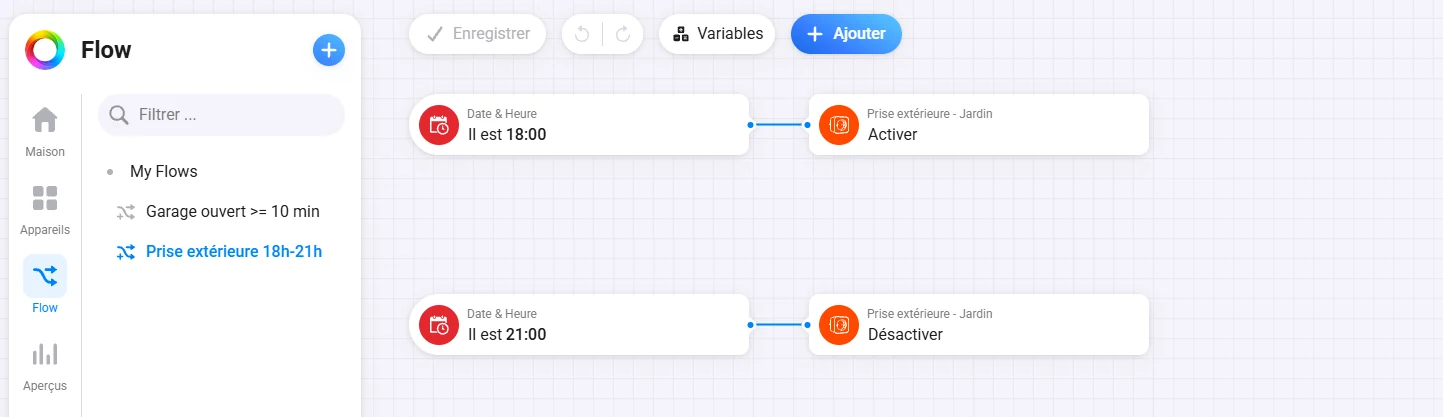
The agent does not guess the cards. It started by reading the description of the Flow cards available on my Homey (triggers, conditions and actions of each app). Then it assembled the Advanced Flow:
It saved it as “Prise extérieure 18h-21h”, enabled it and told me which time zone it used (Paris time). In the Flow tab, those four cards are exactly what you see.
The more precise the prompt, the fewer surprises. The ones that work well for me share the same shape: exact device, time, action, and what must not be touched.
The last one is my favourite: asking for a plan before action gives you time to review.
I do not trust blindly, even when everything looks fine. After each flow the agent creates:
An AI acting on your home is not trivial. Here is what I keep in mind:
Homey also offers built-in Claude and ChatGPT integrations: they appear in the app’s settings (see the screenshot above). According to Athom’s help pages, they go through the Homey MCP server and a sign-in with your Homey account, and among other things let you control devices and create or update Flows and Advanced Flows. That is the simplest route if you already use one of these assistants.
I chose an API key with a Grok agent for a practical reason: I already use this agent for other tasks, and the key lets me decide the permissions myself, then revoke it in one go. I am not comparing assistants’ performance here: I only tested my own setup.
Everything runs on a Homey Pro mini, which I unboxed and set up here. To choose between hubs, see Home Assistant, Jeedom or Homey. Availability of the Homey Pro mini varies by country: see the official Homey Pro mini page. For a schedule like mine, any weatherproof outdoor smart plug supported by your Homey will do; check the Homey App Store before buying.
Can the agent break my existing flows? It can do whatever the key allows. In my case it did not touch “Garage ouvert >= 10 min”, and I say so explicitly in my prompts. Limit permissions and review after each creation.
Do I need to code? No. I did not write a single line of code: one sentence was enough. You do need to be able to read a flow in the app.
What happens if I revoke the key? The agent loses access to the Homey. Flows already created stay in place and keep running.
Does it work on an older Homey Pro (2019)? According to an Athom developer on the official forum, API keys are only available on the newer generation of Homey Pro.
Further reading
Section hub: smart home.
Torn between two models or stuck on a build? Drop us a line and we will get back to you by email.