mBot ultrasonic sensor (4/4): slow down and stop at an obstacle
mBlock tutorial (4/4): the mBot drives, slows down and stops before a flat obstacle — cm thresholds, motor speed, USB upload tests.

mBlock tutorial (4/4): the mBot drives, slows down and stops before a flat obstacle — cm thresholds, motor speed, USB upload tests.

AI-generated illustration
Some links on this page are affiliate links. If you buy through them, we may earn a commission at no extra cost to you.
Direct answer (October 2026) — In mBlock 5 (Makeblock’s block software, close to Scratch), read the ultrasonic distance in cm (centimetres), compute a motor speed between two thresholds (e.g. stop at 15 cm, full speed beyond 50 cm), and set left and right motors to the same speed. Upload over USB (data cable from PC to the board), place a flat book in front: the robot should slow down then stop without hitting it. No Arduino text code is required.
You are finishing the ultrasonic sensor track on the Makeblock mBot educational robot: the front module that measures distance in centimetres. Goal: the robot drives, slows down as an obstacle approaches, then stops. Everything runs in mBlock with mBot blocks.
| Item | Detail |
|---|---|
| Level | Intermediate (loop, conditions, simple formula) |
| Time | About 45–75 minutes |
| Hardware | mBot with front ultrasonic sensor, PC, USB cable, flat obstacle |
| Software | mBlock 5, Device mode → mBot, then Upload |
| Success check | Fast above ~50 cm, slower between 50 and 15 cm, full stop near 15 cm |
With mBot blocks in mBlock, program the robot so that it:
We want a smooth progression, not only “go / stop”. Speed is computed from distance.
Start with:
DIST_STOP = 15 cm (below: stop)DIST_SLOW = 50 cm (beyond: normal speed)Between 15 and 50 cm, speed decreases gradually.
| Distance in front of the sensor | mBot behaviour |
|---|---|
| ≥ 50 cm | Normal speed (e.g. 80 %) |
| Between 15 and 50 cm | Progressive slowdown |
| ≤ 15 cm | Stop (speed 0) |

Suggested variables:
distance_cmspeed (0 to 100)As in measure distances:
wait after each read.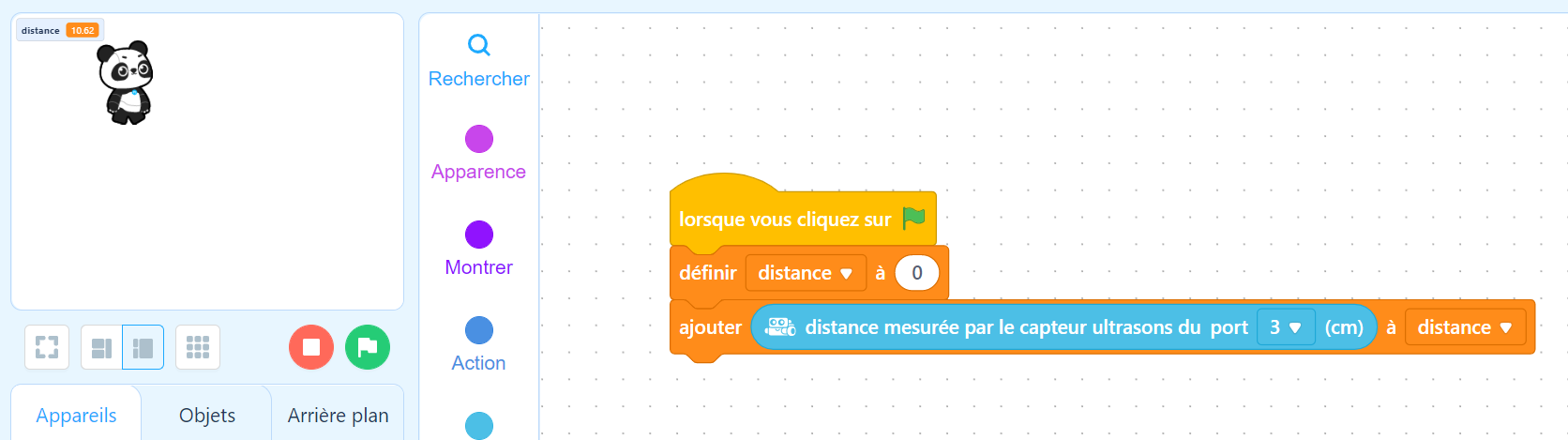
Example speeds:
SPEED_MAX = 80SPEED_MIN = 30 (still moving, but slow)Rules:
distance_cm >= 50 → speed = 80distance_cm <= 15 → speed = 0Between 15 and 50 cm:
speed = SPEED_MIN + (distance_cm - 15) × (SPEED_MAX - SPEED_MIN) / (50 - 15)
(denominator 35.)
Prefer steps instead? Use 3–4 speed steps like in episode 2 (French) — here we target smooth slowdown.
Straight ahead = same speed on left and right motors (or a “move forward” block).
Global pseudo-logic:
on start
  forever
    set distance_cm to (ultrasonic distance)

    if distance_cm <= 15
      set speed to 0
      stop motors
      play long low note / beep
      wait 0.1 s
    else
      if distance_cm >= 50
        set speed to 80
      else
        set speed using formula (between SPEED_MIN and SPEED_MAX)

      move forward (left motor = speed, right motor = speed)
      play short beep
wait 0.5 s (or shorter when slowing)Keep it readable: play note, then wait.
DIST_STOP to 18 cm ;wait 0.05 s after the sensor read ;SPEED_MIN around 30–40 instead of 10.Success: at ~40 cm it moves fast; near 25 cm you hear or see slowdown; near 15 cm it stops without a bump.
distance_cm, set speed<=, >=, +, -, *, /Stuck on mBlock? See first steps with mBlock 5 or Bluetooth troubleshooting.
| Symptom | Likely cause | What to try |
|---|---|---|
| Distance stuck at 0 or 400+ | Obstacle too close/far, or tilted / soft surface | Flat target 20–80 cm away; sensor perpendicular |
| No slowdown | Speed not wired to both motors | Check left and right motor blocks use speed |
| Stuttering near obstacle | Stop threshold too low | DIST_STOP → 18 cm; small wait after sensor |
| No beeps | Buzzer block missing or volume | Test a single “play note” before the loop |
| Robot not found in mBlock | USB/charge-only cable or wrong mode | First upload guide |
Before buying a spare sensor, check the front RJ25 port (Makeblock colour-coded connector) — see mBot accessories: where to start if your kit is incomplete.
mBlock / mBot blocks only. No Arduino sketch is required for this session.
Distance in centimetres to an obstacle ahead. Your thresholds turn that into motor speed.
Yes, with mBot blocks and a working front ultrasonic module. Tune cm thresholds on your own floor.
Amazon.ca · Amazon.ca — check today’s price. Amazon partner — commission possible on qualifying purchases, at no extra cost to you.
← Episode 3 — beeping radar (French) · Measure distances (English) · First mBot program · Install mBot blocks
Emmanuel Sauvage — updated 31 October 2026.
Torn between two models or stuck on a build? Drop us a line and we will get back to you by email.