Which educational robot to choose in 2026?
2026 buying guide: robot families, age×budget table, blocks or Python. UK/US prices, troubleshooting and FAQs (October 2026).

2026 buying guide: robot families, age×budget table, blocks or Python. UK/US prices, troubleshooting and FAQs (October 2026).
Direct answer (October 2026) — In 2026, decide by age, language (blocks vs Python) and budget: hub best programmable robot + guides from age 5 to age 12.
Shops on this English page — Search links default to the US Amazon store. Canadian readers can use the Amazon.ca links in the Amazon links section and confirm the box contents before checkout.
Choosing an educational robot in 2026 is not about “the best brand on paper”, but about aligning three realities: the child’s real age (motivation included), the time you can spend on setup and updates, and a total budget including accessories and batteries. Scratch here means a block-based coding language (you snap instructions together instead of typing syntax) — the usual entry path between about 7 and 12 on this site. Python is a text programming language: you type code on a keyboard; it usually needs fluent reading and some typing, and fits best from about 10–11 with support, or earlier if blocks are already easy.
This guide is deliberately structured by product families: you identify your profile, then refine with our detailed articles and Amazon searches to compare prices and availability today.
Price guidance — Ranges are indicative only. On Amazon.ca, check today’s price (often roughly CA$80–110 for a classic mBot pack, CA$140–190 for mBot2). Use the Amazon.ca links below and verify the box contents before paying.
| Age | Guide on this site |
|---|---|
| 5 | Best robot for a 5-year-old |
| 8 | Best robot for an 8-year-old |
| 10 | Best robot for a 10-year-old |
| 12 | Best robot for a 12-year-old |
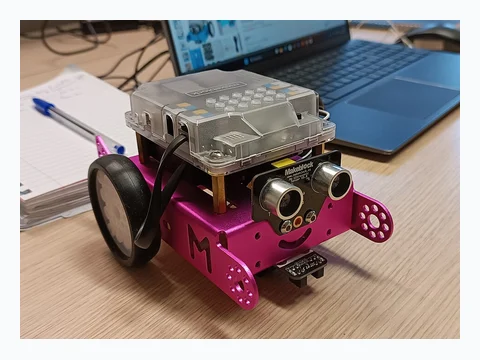
Makeblock mBot product photo (editorial comparison). Credit: Emmanuel Sauvage, Robot Éducatif — October 2026.

Makeblock mBot2 product photo (editorial comparison). Credit: Emmanuel Sauvage, Robot Éducatif — October 2026.
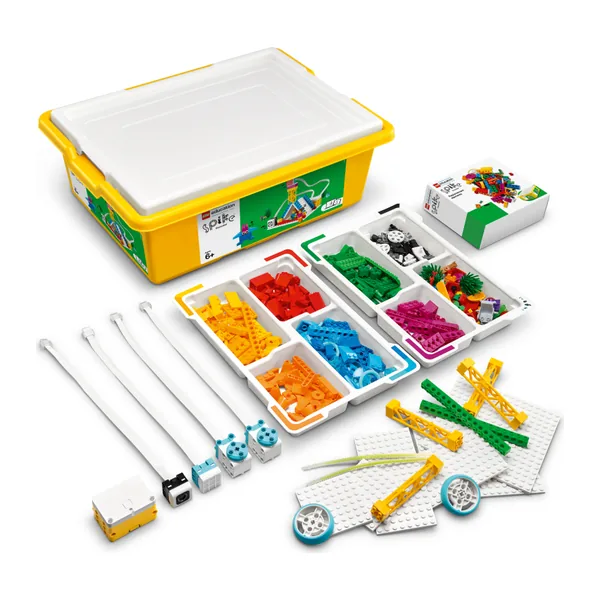
LEGO SPIKE Essential product photo (editorial comparison). Credit: Emmanuel Sauvage, Robot Éducatif — October 2026.
| Profile | Main need | Robot family to prioritise |
|---|---|---|
| Discovery ages 5–7, little screen time | Logic, sequences, physical play | Screen-free robots (ages 4–7), coding games, simple board / mobile robots |
| Light secondary ages 7–10, PC at home | Scratch-style blocks, sensors, challenges | Makeblock (mBot…), sometimes LEGO SPIKE Essential if budget allows |
| Passion ages 10–14, long project | Scratch + text, varied sensors | mBot2, Codey Rocky, LEGO SPIKE Prime, boards like CyberPi |
| Teen / sixth form, technical autonomy | Python, Linux, tinkering | Raspberry Pi getting started, sensor kits, sometimes robot + board |
If you are already stuck between two Makeblock models, continue with mBot vs mBot2 or mBot vs Codey Rocky.
mBlock is Makeblock’s free software (blocks and sometimes Python) for mBot, mBot2 and Codey Rocky.
Examples: mBot, mBot2, Codey Rocky.
Direct comparison with Makeblock: mBot vs LEGO.
Arduino means a family of programmable microcontroller boards (open source) wired to sensors, LEDs and motors; you usually program them in C/C++ with the free Arduino IDE, for DIY builds rather than a ready-made toy robot.
Raspberry Pi (small Linux computer), microcontrollers and sensor kits: for families where an adult enjoys tinkering. Little “pretty all-in-one robot”, but a very high ceiling — see Raspberry Pi getting started and Pi 3 vs 4 vs 5.
Use this table as a filter, not an absolute law:
| Indicative age | Adult little available | Adult available + Windows PC |
|---|---|---|
| 5–6 | Screen-free games, few parts | Reinforce with books / guided activities |
| 7–8 | Simple robot or short workshops | mBot or SPIKE Essential if budget |
| 9–10 | Packaged model with video tutorials | mBot2 already relevant |
| 11–14 | Second-hand FIRST LEGO League (FLL) / Prime if club | SPIKE Prime or mBot2 + Python |
Expandability (summary):
First Scratch/mBlock robot · ~15 min build · matches “mBot” rows in the table.
Amazon.caApply section 1 + the decision table: an 8-year-old with a parent available for setup and a CA$132 (or local equivalent) ceiling usually lands on a classic mBot pack, not SPIKE Prime and not a bare Raspberry Pi. Confirm the listing includes the robot (not only spare parts), install mBlock before the first session, and keep one spare battery set.
| Symptom | Common cause | What to do |
|---|---|---|
| Robot won’t connect over Bluetooth | Weak batteries, missing USB driver, outdated mBlock | Use USB for the first session; follow mBlock Bluetooth troubleshooting |
| mBlock doesn’t see the robot | Wrong model selected, charge-only cable | Pick mBot (mCore) or mBot2 in the device list; reinstall the CH340 driver if Windows asks — install mBlock |
| Child loses interest after two sessions | Robot too hard or too “toy-like” for their age | Re-read the guide for 8-year-olds or screen-free ideas for ages 4–7 |
| Missing parts in the box | Third-party seller, refurbished pack | Contact the seller within 30 days; compare the parts list on Makeblock or LEGO |
| SPIKE hard to find new | Some SPIKE sets no longer sold direct by LEGO | See SPIKE alternatives 2026 or buy a new mBot2 |
Ages 5–7: start with screen-free ideas. From 8 with a PC, a classic mBot is the usual first programmable robot here.
Install mBlock 5 (Windows guide) or the SPIKE app from the box. Test once before the gift moment.
mBot for first blocks; mBot2 if you already want Python. Details: mBot vs mBot2.
LEGO for long brick sessions; Makeblock for a rolling robot and one app (mBlock). See mBot vs LEGO.
Install mBlock 5 (Windows guide) or the SPIKE app from the box. Test once before the gift moment.
Compare packs on Amazon.ca first, then Amazon.ca if you shop in the US:
Amazon partner — commission possible on qualifying purchases, at no extra cost to you.
In short: in 2026, the right robot is the one that gets plugged in often. Start with the family profile (section 1), cross-check with the decision table, then use the site’s comparisons and Amazon.ca / Amazon.ca links to validate price, packs and reviews at the exact moment you buy.
Emmanuel Sauvage
Torn between two models or stuck on a build? Drop us a line and we will get back to you by email.