Python conditions: if, elif, else — lesson 4 (20 exercises)
Learn if, elif and else in Python 3: comparisons, and, or, not, menus and grades. Twenty corrected exercises, plus the next steps in the terminal, for class.

Learn if, elif and else in Python 3: comparisons, and, or, not, menus and grades. Twenty corrected exercises, plus the next steps in the terminal, for class.

AI-generated illustration
Some links below are affiliate links. Amazon.co.uk is the default shop; an Amazon.co.uk link is included for US readers. Check today’s price — we do not invent local amounts.
Direct answer (October 2026) — In Python 3, a condition (if, elif, else) chooses which statements run depending on whether a test is true or false. You compare values with ==, !=, <, >, … and combine tests with and, or, not. No robot needed: a terminal (the window where you run python) is enough.
Lesson 4 of the Python course. Build on lesson 3 — types and input (int(input(...)), etc.). Next up: lesson 5 — loops, then the terminal “higher or lower” mini-game which mixes conditions and loops.
| Information | Detail |
|---|---|
| Goal | Write readable if / elif / else and test keyboard input |
| Level | Beginner (after variables and input) |
| Time | 45–90 min (lesson + 5–10 exercises) |
| Equipment | PC with Python 3 (free interpreter) |
| Prerequisites | Lesson 2 — variables, lesson 3 — input |
| Expected result | Scripts that print even/odd, validate a grade, react to a menu |
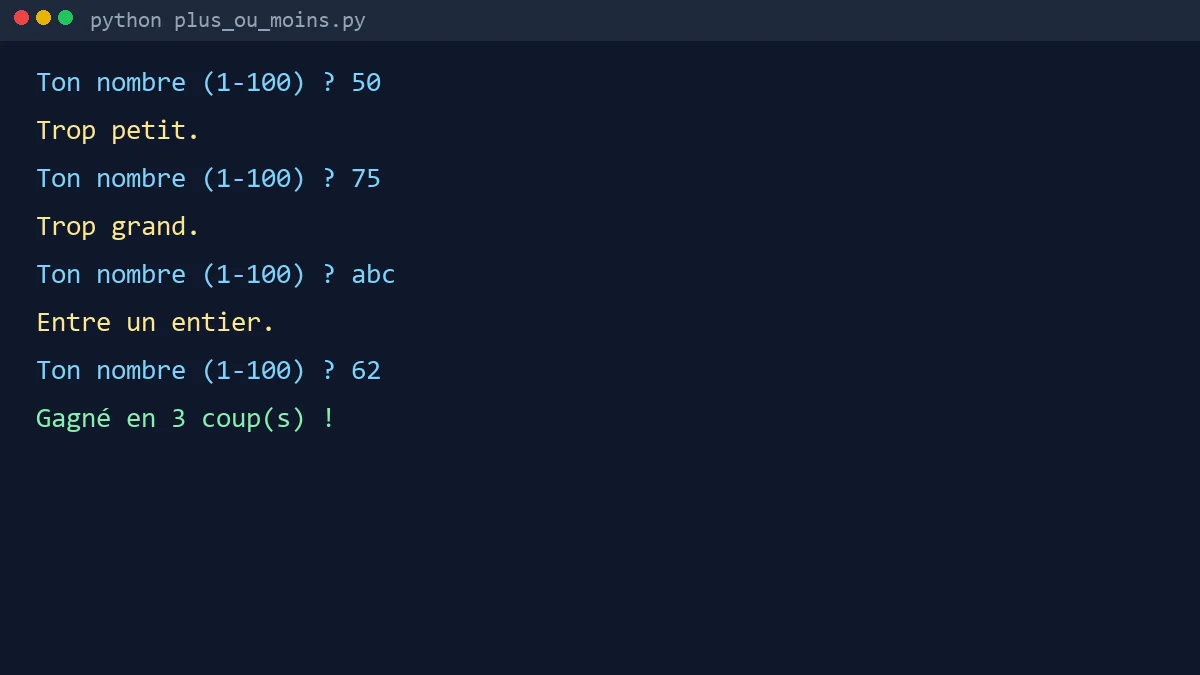
Reconstructed session: the same comparison idea powers higher-or-lower (exercise 4) and the terminal mini-project. Credit: Emmanuel Sauvage, Educational Robotics — October 2026.
Conditions decide which part of the program runs. In Python, a block that depends on an if is marked by indentation (usually 4 spaces): no curly braces {} as in C or Java.
Comparisons: == (equal), != (not equal), <, >, <=, >=.
Combine tests:
and: both must be true.or: at least one true.not: inverts the result.age = 14
if 10 <= age <= 18: # handy “between” form in Python
print("Collège / lycée")if / elsenote = int(input("Note sur 20 ? "))
if note >= 10:
print("Validé")
else:
print("À retravailler")The : after the condition is required. The next line must be indented.
elifPython tests conditions in order and runs the first block whose condition is true. Cover the “everything else” case with a final else when needed.
note = int(input("Note /20 ? "))
if note >= 16:
    mention = "Très bien"
elif note >= 14:
    mention = "Bien"
elif note >= 12:
    mention = "Assez bien"
elif note >= 10:
    mention = "Passable"
else:
    mention = "Insuffisant"
print(f"Mention : {mention}")
If several if statements follow without elif, several blocks could run; with elif, only one block “wins”.
An “empty” value can act as a condition:
texte = input("Pseudo (Entrée = anonyme) ? ").strip()
if not texte:
    texte = "Invité"
print(f"Bonjour {texte}")(not texte is true for "", but note: not "0" is false because the string is not empty.)
You can put an if inside another: keep indentation consistent. For complex cases, functions (lesson 6) help split the code.
test_conditions.py with one of the examples above.python test_conditions.py and try at least one “true” and one “false” value for each branch.: after if / elif / else and that the next line is indented.| Symptom | Likely cause | Fix |
|---|---|---|
IndentationError |
No spaces after if: |
Indent the block with 4 spaces (or one consistent tab) |
Odd comparison (10 < "2") |
input() without int() |
Convert: n = int(input(...)) (lesson 3) |
| Several messages printed | Several if instead of elif |
Chain with elif for a single choice |
SyntaxError on else |
else misplaced |
else must follow an if / elif chain, same indentation level |
ValueError on int(input()) |
Non-numeric text | Clear message to the user; later try / except |
Each exercise uses this lesson’s conditions (if, elif, else, and, or, not, comparisons). Solutions are hidden by default: click Show the solution to compare your code.
Exercise 1 — With n = 8, print pair or impair depending on whether n % 2 equals 0 or not. Easy
n = 8
if n % 2 == 0:
    print("pair")
else:
    print("impair")
Exercise 2 — Ask for an integer with int(input(...)) and print whether it is strictly positive, strictly negative, or zero. Easy
n = int(input("Un entier ? "))
if n > 0:
    print("positif")
elif n < 0:
    print("négatif")
else:
    print("nul")
Exercise 3 — Two variables a = 3 and b = 9: print the larger of the two using only if / else (no max). Easy
a = 3
b = 9
if a >= b:
    print(a)
else:
    print(b)
Exercise 4 — Higher or lower (one guess): secret = 42. Ask for an integer; print trop petit, trop grand, or gagné according to the comparison. Easy
secret = 42
n = int(input("Nombre entre 1 et 100 ? "))
if n < secret:
    print("trop petit")
elif n > secret:
    print("trop grand")
else:
    print("gagné")
Exercise 5 — Ask for a string; if, after strip(), it is empty, print Erreur : pseudo vide; otherwise print Bienvenue, followed by the string. Easy
s = input("Pseudo ? ").strip()
if not s:
    print("Erreur : pseudo vide")
else:
    print("Bienvenue,", s)
Exercise 6 — x = int(input(...)): print dans [0, 10] if 0 <= x <= 10, otherwise hors plage. Easy
x = int(input("Un nombre ? "))
if 0 <= x <= 10:
    print("dans [0, 10]")
else:
    print("hors plage")
Exercise 7 — ok = True: if ok is true, print OK; otherwise print KO (use if ok: without == True). Easy
ok = True
if ok:
    print("OK")
else:
print("KO")Exercise 8 — Ask for an age (int). If < 0 or > 120, print âge improbable; else if age < 18 print mineur, else majeur. Intermediate
age = int(input("Âge ? "))
if age < 0 or age > 120:
    print("âge improbable")
elif age < 18:
    print("mineur")
else:
    print("majeur")
Exercise 9 — Ask for a grade out of 20 (int). Print recalé if < 10, passable if < 12, bien if < 16, else très bien (elif chain). Intermediate
note = int(input("Note /20 ? "))
if note < 10:
    print("recalé")
elif note < 12:
    print("passable")
elif note < 16:
    print("bien")
else:
    print("très bien")
Exercise 10 — Menu: print 1 = Salut and 2 = Au revoir, ask for a choice (input), print the message; if it is neither 1 nor 2, print option inconnue. Intermediate
print("1 = Salut")
print("2 = Au revoir")
c = input("Choix ? ")
if c == "1":
    print("Salut")
elif c == "2":
    print("Au revoir")
else:
    print("option inconnue")
Exercise 11 — Ask for a and b (integers). If a == b print égaux; otherwise print which is larger (a or b). Intermediate
a = int(input("a ? "))
b = int(input("b ? "))
if a == b:
    print("égaux")
elif a > b:
    print("a est plus grand")
else:
    print("b est plus grand")
Exercise 12 — n = int(input(...)): with and, print dans la plage only if n is ≥ 10 and ≤ 20. Otherwise print dehors. Intermediate
n = int(input("n ? "))
if n >= 10 and n <= 20:
    print("dans la plage")
else:
    print("dehors")
Exercise 13 — Ask for a character or short string rep. Print oui if rep is o or O (after strip()), non if n or N, else réponse inattendue. Intermediate
rep = input("o/n ? ").strip()
if rep == "o" or rep == "O":
    print("oui")
elif rep == "n" or rep == "N":
    print("non")
else:
    print("réponse inattendue")
Exercise 14 — x = int(input(...)): print positif ou nul if x >= 0; otherwise use a nested if to print négatif pair or négatif impair from the parity of x. Intermediate
x = int(input("x ? "))
if x >= 0:
    print("positif ou nul")
else:
    if x % 2 == 0:
        print("négatif pair")
    else:
print("négatif impair")Exercise 15 — Ask for a password (string). If its length is strictly less than 6, print trop court; else if strictly greater than 24, print trop long; else print OK. Hard
mdp = input("Mot de passe ? ")
if len(mdp) < 6:
    print("trop court")
elif len(mdp) > 24:
    print("trop long")
else:
    print("OK")
Exercise 16 — Ask for a grade out of 20. If the grade is outside 0 to 20, print note invalide; otherwise chain elif for mentions as in the lesson (e.g. 16+ → très bien, 14+ → bien, 12+ → assez bien, 10+ → passable, else insuffisant). Hard
note = int(input("Note /20 ? "))
if note < 0 or note > 20:
    print("note invalide")
elif note >= 16:
    print("Très bien")
elif note >= 14:
    print("Bien")
elif note >= 12:
    print("Assez bien")
elif note >= 10:
    print("Passable")
else:
    print("Insuffisant")
Exercise 17 — a, b, c = three integers entered. Print tous égaux, deux égaux, or tous différents as appropriate. Hard
a = int(input("a ? "))
b = int(input("b ? "))
c = int(input("c ? "))
if a == b == c:
    print("tous égaux")
elif a == b or a == c or b == c:
    print("deux égaux")
else:
    print("tous différents")
Exercise 18 — Ask for age for a reduced fare: under 12 → enfant, 12–17 → ado, 18–64 → adulte, 65+ → senior; if age is negative or over 120 → âge invalide. Hard
age = int(input("Âge ? "))
if age < 0 or age > 120:
    print("âge invalide")
elif age < 12:
    print("enfant")
elif age <= 17:
    print("ado")
elif age <= 64:
    print("adulte")
else:
    print("senior")
Exercise 19 — Ask two yes/no answers; treat oui (any case, after strip()) as true. Print les deux if both true, au moins un if exactly one is, aucun otherwise. Hard
u = input("Premier oui/non ? ").strip().lower() == "oui"
v = input("Deuxième oui/non ? ").strip().lower() == "oui"
if u and v:
    print("les deux")
elif u or v:
    print("au moins un")
else:
    print("aucun")
Exercise 20 — Ask for an integer n. Print Fizz if a multiple of 3, Buzz if a multiple of 5, FizzBuzz if both, otherwise print n (use elif so only one message appears). Hard
n = int(input("n ? "))
if n % 15 == 0:
    print("FizzBuzz")
elif n % 3 == 0:
    print("Fizz")
elif n % 5 == 0:
    print("Buzz")
else:
print(n)You now control branches; lesson 5 — for and while loops repeats code (several guesses in higher-or-lower, walking a list). Continue with the terminal “higher or lower” mini-game combining if, while, and random. To revisit the series: Python programming hub, lists and strings (lesson 7), Hangman and Battleship if you enjoy text games. Refresh input with lesson 3 — types and input.
Prices on Amazon change; check the listing and edition before buying.
Emmanuel Sauvage — updated 31 October 2026.
Torn between two models or stuck on a build? Drop us a line and we will get back to you by email.