Python 3 input: types and asking for a value (lesson 3)
Python input and types: int, float, str, bool, conversions, strip(). 20 exercises with solutions for asking a value from the keyboard.

Python input and types: int, float, str, bool, conversions, strip(). 20 exercises with solutions for asking a value from the keyboard.
You already know how to display variables (lesson 2 — variables and printing). Here the program reacts to what the user types. In Python 3, everything goes through input(): it asks for a value, waits for Enter, and always returns a text string (str). Converting cleanly to int or float is essential before conditions and projects such as higher or lower.
Lesson 3 of the Python track. No robot needed: a terminal or editor console is enough.
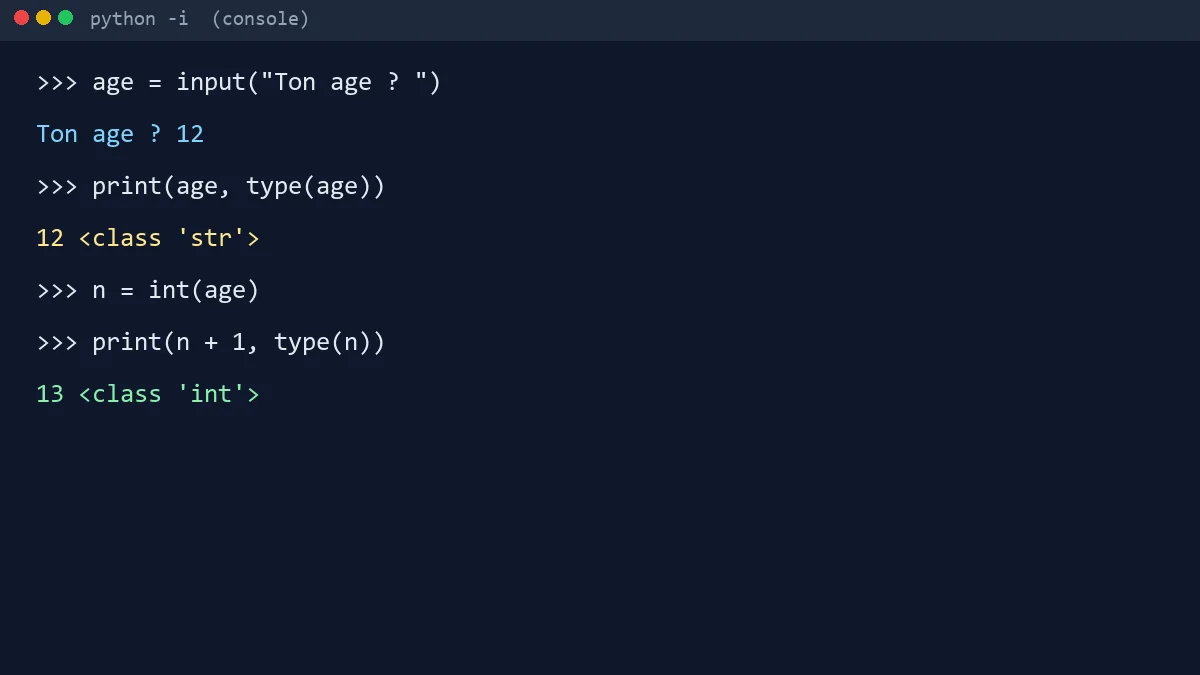
Console session: input() returns a text string, then int() converts it so the program can calculate.
Quick glossary: str = text string; int = whole number; float = decimal number; bool = True / False.
Python handles values of different types. The first four to master:
| Type | Short role | Examples |
|---|---|---|
int |
integer (whole number) | 42, -3, 0 |
float |
decimal number | 3.14, 2.0 |
str |
text string | "hello", 'x' |
bool |
true / false | True, False |
To inspect the type while learning:
x = 10
y = "10"
print(type(x), type(y)) # <class 'int'> <class 'str'>int("42") → 42. Fails on "3.5" or "twelve" → ValueError.float("3.5") or float("2") → decimal number.str(2026) → "2026" (to concatenate or build a message).Practical rule: as soon as you want to calculate from keyboard input, convert after input().
input(): always textanswer = input("An integer? ")
n = int(answer)
print(f"The next one is {n + 1}")Leading/trailing spaces are often annoying. Many scripts start with:
text = input("City? ").strip()strip() removes spaces (and invisible newlines) at the start and end of the string.
bool and comparisons (preview)Comparisons (==, <, …) already produce a boolean. You can also write bool(0) → False, bool(1) → True (details come with practice of if).
"3" + "5" gives "35". For a sum:
a = int(input("First number? "))
b = int(input("Second number? "))
print(a + b)
If the user enters 3.5 when you expected an int, int() raises an error: lesson 9 — errors and debugging shows how to handle that with try / except.
Exercises assume you run the script and type the requested values in the console. Solutions are hidden by default: open Show the solution to compare.
Exercise 1 — Print with print the results of type(7) and type("7") (two values on one line or two prints). Easy
print(type(7), type("7"))Exercise 2 — Ask for text with input("Your first name? ") (no conversion), store in name, then print Hello followed by a comma and name with a single print and commas. Easy
name = input("Your first name? ")
print("Hello,", name)
Exercise 3 — Ask for a sentence with input(), chain .strip() on the same line as input, print the cleaned string between quotes in a message like You wrote: .... Easy
sentence = input("A sentence: ").strip()
print(f"You wrote: {sentence}")
Exercise 4 — Create a variable s = "15", convert to integer with int(s), print the result and its type(...). Easy
s = "15"
n = int(s)
print(n, type(n))
Exercise 5 — Create t = "2.5", convert to float, print the value multiplied by 2 (no f-string: a single print with a comma is enough). Easy
t = "2.5"
x = float(t)
print(x * 2)
Exercise 6 — With n = 2026, print the string "Year: " followed by str(n) using concatenation with +. Easy
n = 2026
print("Year: " + str(n))
Exercise 7 — Ask for two strings with two input() calls (word1, word2) and print their direct concatenation (no space), to show the trap "3" + "5" → "35". Easy
word1 = input("First word: ")
word2 = input("Second word: ")
print(word1 + word2)Exercise 8 — Ask for an integer with input, convert with int, print The next one is followed by n + 1 (f-string). Intermediate
n = int(input("An integer? "))
print(f"The next one is {n + 1}")
Exercise 9 — Ask for a decimal number (float), print its double with an f-string. Intermediate
x = float(input("A decimal number? "))
print(f"Double: {x * 2}")
Exercise 10 — Ask for two integers, print their sum and their product on two lines (two prints or two f-strings). Intermediate
a = int(input("First integer? "))
b = int(input("Second integer? "))
print(f"Sum: {a + b}")
print(f"Product: {a * b}")
Exercise 11 — Ask for a first name (string) and an age (int), then print … is … years old with an f-string. Intermediate
name = input("First name? ")
age = int(input("Age? "))
print(f"{name} is {age} years old")
Exercise 12 — Ask for a temperature in °C as float, compute °F with f = c * 9 / 5 + 32 and print the result rounded to 1 decimal with round(f, 1) in the message. Intermediate
c = float(input("Temperature °C? "))
f = c * 9 / 5 + 32
print(f"In °F: {round(f, 1)}")
Exercise 13 — Ask for a string (do not convert to a number), print its length with len(...). Intermediate
text = input("A word or sentence: ")
print(len(text))
Exercise 14 — Read a string that represents a decimal (e.g. "12.5") in the code (s = "12.5"), convert to float, print three times the value. Intermediate
s = "12.5"
x = float(s)
print(x * 3)Exercise 15 — Ask for three integers in a row, compute the sum and the average (a+b+c)/3, print both with f-strings (the average may show decimals). Hard
a = int(input("a? "))
b = int(input("b? "))
c = int(input("c? "))
total = a + b + c
average = total / 3
print(f"Sum: {total}")
print(f"Average: {average}")
Exercise 16 — Ask for a float, then print the value rounded to 2 decimals using round(x, 2) inside an f-string. Hard
x = float(input("Number? "))
print(f"Rounded value (2 dec.): {round(x, 2)}")
Exercise 17 — Ask for a string, apply .strip(), convert to int, then print the square n * n with an f-string. Hard
n = int(input("An integer (spaces allowed): ").strip())
print(f"Square: {n * n}")
Exercise 18 — Ask for two numbers as float, compute and print the average (a+b)/2 with a clear message. Hard
a = float(input("First number? "))
b = float(input("Second number? "))
m = (a + b) / 2
print(f"Average: {m}")
Exercise 19 — Ask for a year of birth and the current year as integers (int), compute an approximate age current - birth and print it (without handling the calendar day: deliberately simplified). Hard
birth = int(input("Year of birth? "))
current = int(input("Current year? "))
age = current - birth
print(f"Approximate age: {age} years")
Exercise 20 — Chain: input of the first name with .strip(), input of a height in metres as float, then an f-string on one line like Paul is about 1.72 m tall (adapt with your variables). Hard
name = input("First name? ").strip()
height = float(input("Height in m? "))
print(f"{name} is about {height} m tall")| Step | Link |
|---|---|
| Next theory (conditions) | Lesson 4 — conditions and if/else — uses these conversions to test values (even / odd, menus, grades) |
| Next practice | Python mini-project: higher or lower — apply input, int, loops and comparisons |
| Files | Python pathlib: paths and files — read and write text once you master conversions |
Torn between two models or stuck on a build? Drop us a line and we will get back to you by email.