Door reed sensor on Raspberry Pi with phone notifications
Wire a magnetic door contact to GPIO, push alerts via ntfy and optional Home Assistant MQTT discovery—full Python script and systemd unit.

Wire a magnetic door contact to GPIO, push alerts via ntfy and optional Home Assistant MQTT discovery—full Python script and systemd unit.
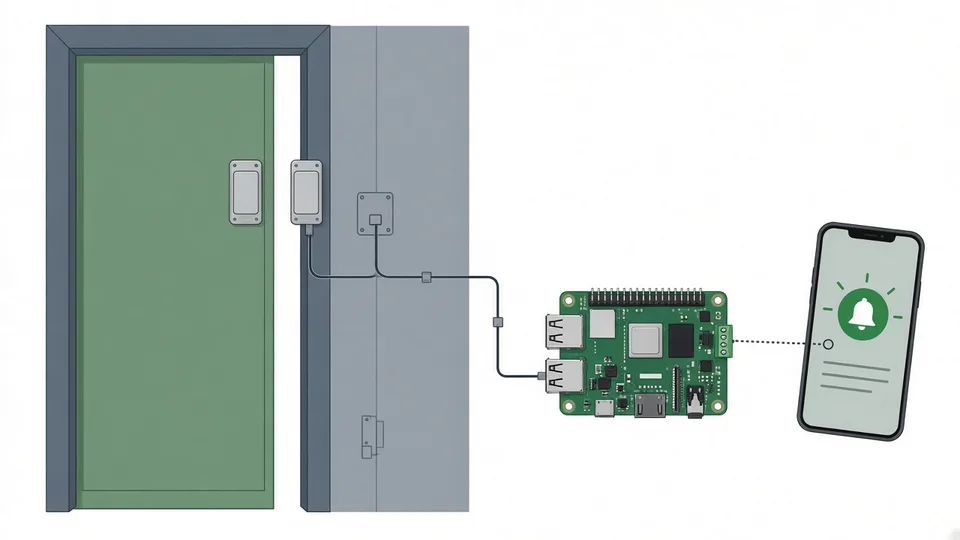
AI-generated illustration
Also available in French.
Quick answer (November 2026) — A reed switch (magnetic door contact) wired to GPIO on a Raspberry Pi tells you when a door opens. This tutorial runs a Python script with gpiozero, sends ntfy push alerts (free, open source) and can publish a door entity in Home Assistant over MQTT (Message Queuing Telemetry Transport).
Part of the smart home hub with PIR motion lighting, garage door ESP32 and install Home Assistant on Pi 5.
Know when the front door, shed or cupboard opens: a two-wire reed switch needs no sensor battery—the Pi detects open/close.
| Time | Level | Budget |
|---|---|---|
| ~45 min | Beginner | Reed switch is inexpensive—check retailers |
Reed (normally open, closes with magnet): UK · US
Internal pull-up—no external resistor.
| Reed | Pi (physical pin) |
|---|---|
| Wire 1 | 11 (GPIO17) |
| Wire 2 | 9 (GND) |
Door closed = magnet near = contact closed = GPIO low. Never apply external voltage to the reed line.
sudo apt update sudo apt install -y python3-venv python3-gpiozero python3-lgpio mkdir -p ~/capteurs && cd ~/capteurs python3 -m venv —system-site-packages venv source venv/bin/activate pip install paho-mqtt # if using HA
ntfy: install the app, subscribe to a long random topic on ntfy.sh (public topics are readable if guessed) or self-host. Set NTFY_URL=https://ntfy.sh/your-secret-topic.
Download: porte_reed_notification.py.
#!/usr/bin/env python3 """Door reed on Raspberry Pi -> ntfy + optional MQTT discovery.""" import json import os import signal import urllib.request from datetime import datetime from gpiozero import Button
REED_GPIO = int(os.getenv(“REED_GPIO”, “17”)) NTFY_URL = os.getenv(“NTFY_URL”, "") MQTT_HOST = os.getenv(“MQTT_HOST”, "") MQTT_PORT = int(os.getenv(“MQTT_PORT”, “1883”)) MQTT_USER = os.getenv(“MQTT_USER”, "") MQTT_PASS = os.getenv(“MQTT_PASS”, "") DEVICE_ID = os.getenv(“DEVICE_ID”, “pi_porte_entree”) STATE_TOPIC = f”robotedu/{DEVICE_ID}/door”
def notifier(message): if not NTFY_URL: return req = urllib.request.Request( NTFY_URL, data=message.encode(“utf-8”), headers={“Title”: “Door”, “Tags”: “door”}, method=“POST”, ) try: urllib.request.urlopen(req, timeout=10).close() except OSError as e: print(“Push failed:”, e, flush=True)
def creer_client_mqtt(): if not MQTT_HOST: return None import paho.mqtt.client as mqtt client = mqtt.Client(mqtt.CallbackAPIVersion.VERSION2, client_id=DEVICE_ID) if MQTT_USER: client.username_pw_set(MQTT_USER, MQTT_PASS) client.connect(MQTT_HOST, MQTT_PORT, keepalive=60) client.loop_start() cfg = { “name”: “Front door”, “unique_id”: f”{DEVICE_ID}_door”, “state_topic”: STATE_TOPIC, “device_class”: “door”, “payload_on”: “ON”, “payload_off”: “OFF”, “device”: {“identifiers”: [DEVICE_ID], “name”: f”Pi door ({DEVICE_ID})”}, } client.publish(f”homeassistant/binary_sensor/{DEVICE_ID}/config”, json.dumps(cfg), retain=True) return client
def main(): client = creer_client_mqtt() reed = Button(REED_GPIO, pull_up=True, bounce_time=0.1)
def publier(etat):
    if client:
        client.publish(STATE_TOPIC, etat, retain=True)

def ouverte():
    heure = datetime.now().strftime("%H:%M:%S")
    print(heure, "OPEN", flush=True)
    publier("ON")
    notifier(f"Door opened at {heure}")

def fermee():
    print(datetime.now().strftime("%H:%M:%S"), "closed", flush=True)
    publier("OFF")

reed.when_released = ouverte
reed.when_pressed = fermee
publier("OFF" if reed.is_pressed else "ON")

def stop(*_):
    reed.close()
    if client:
        client.loop_stop()
        client.disconnect()
    raise SystemExit(0)

signal.signal(signal.SIGTERM, stop)
signal.signal(signal.SIGINT, stop)
signal.pause()
if name == “main”: main()
Enable Mosquitto broker and the MQTT integration. The script publishes MQTT discovery on homeassistant/.../config. Create a dedicated HA user and pass MQTT_USER / MQTT_PASS.
Create /etc/systemd/system/porte-reed.service (adjust user pi and paths):
[Unit] Description=Door reed (robot-educatif.info) After=network-online.target Wants=network-online.target
[Service] User=pi WorkingDirectory=/home/pi/capteurs Environment=NTFY_URL=https://ntfy.sh/your-secret-topic Environment=MQTT_HOST=192.168.1.10 Environment=MQTT_USER=pi Environment=MQTT_PASS=change-me ExecStart=/home/pi/capteurs/venv/bin/python /home/pi/capteurs/porte_reed_notification.py Restart=on-failure RestartSec=10
[Install] WantedBy=multi-user.target
sudo systemctl daemon-reload sudo systemctl enable —now porte-reed.service journalctl -u porte-reed.service -f
Instead of every open, notify only if open 5 minutes in HA:
alias: Front door left open triggers:
Run the script without NTFY_URL if you only want this HA automation.
when_pressed / when_released for normally-closed reeds.bounce_time to 0.2–0.3 s.curl -d test https://ntfy.sh/your-topic from the Pi.Sources: gpiozero Button · ntfy publish · HA MQTT binary sensor.
Also: garage door ESP32 · PIR motion.
Torn between two models or stuck on a build? Drop us a line and we will get back to you by email.