Programming gifts for teens: Christmas 2026 shortlist
What to give a teen who already codes? Raspberry Pi 5, an ELEGOO Arduino car, or mBot2. Christmas 2026 shortlist with the 6 November price reading.

What to give a teen who already codes? Raspberry Pi 5, an ELEGOO Arduino car, or mBot2. Christmas 2026 shortlist with the 6 November price reading.
AI-generated illustration
Disclosure: This guide includes Amazon affiliate links. As an Amazon Associate we earn from qualifying purchases, at no extra cost to you.
A teen who spends evenings on a forum, talks about Python or home automation, and finds “toy” robots too closed, is not waiting for the same gift as an 8-year-old. They want hardware they can still use in high school, a project that lasts several weeks, and the freedom to choose their language. This guide compares three realistic gifts for ages 14–18: a Raspberry Pi 5, an ELEGOO Arduino car kit, and the mBot2 only as a bridge.
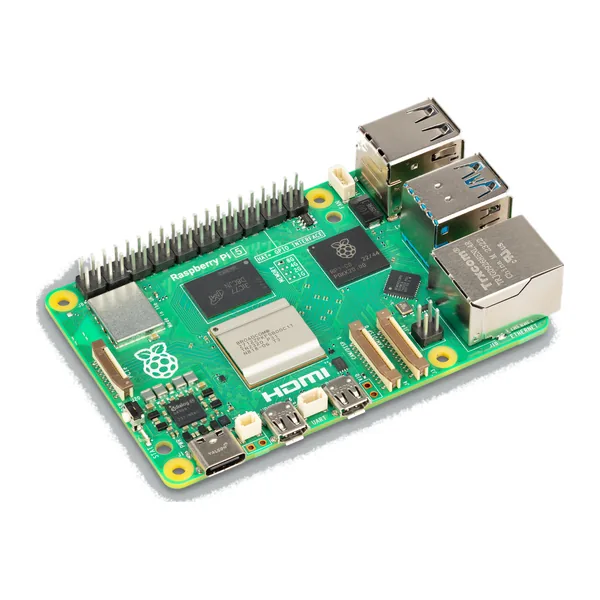
Top pick for a teen
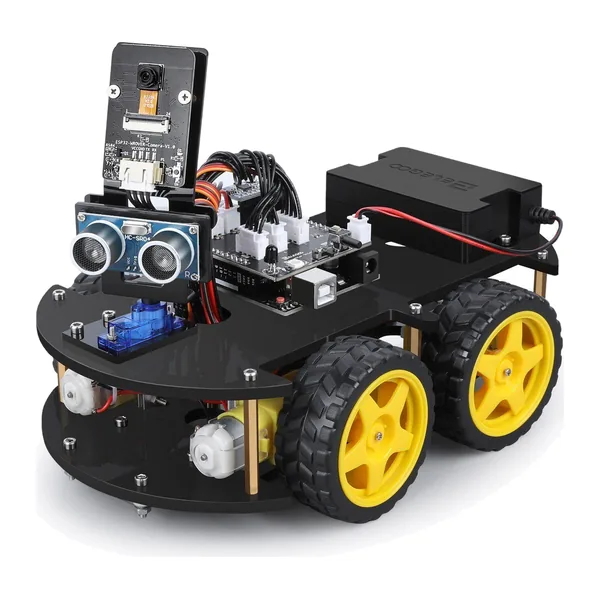
A concrete Arduino project
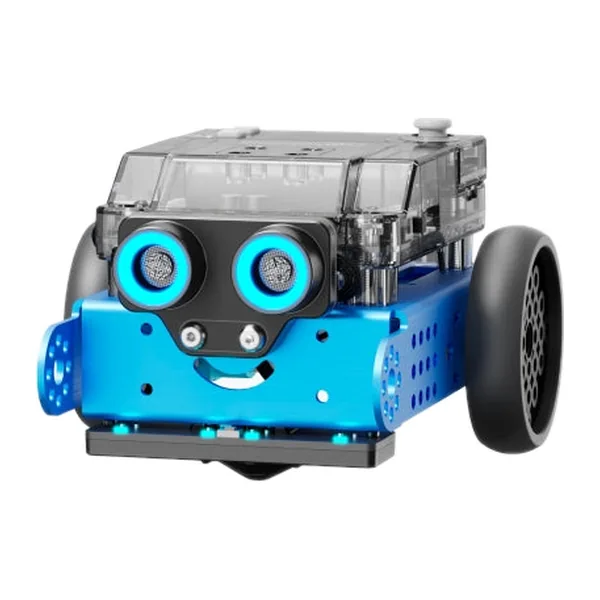
Python/IoT bridge
| Model | Age | Languages | Indicative price | Highlights | Where to buy |
|---|---|---|---|---|---|
 Raspberry Pi 5 (8GB) Top pick for a teen | 12+ years | Python, C++, JavaScript | See today's price | 8 GB RAM for vision & Docker • Huge maker community | |
 ELEGOO Smart Robot Car V4.0 A concrete Arduino project | 13+ years | Arduino C | See today's price | Complete UNO R3 kit • Step-by-step tutorials included | |
 Makeblock mBot2 Python/IoT bridge | 10–14 years | Scratch, Python | See today's price | CyberPi with colour screen • Python and Scratch |
The prices below come from typical Amazon.co.uk listings. They are board or kit prices, not a complete basket. The power supply, the case, the memory card, and books often change. Check their price that day on the listing. It is not added up here.
At this age, many already read a manual in English, find an error on a forum or Discord, and install a system themselves. Some manage a Git repository. The useful gift is then clear documentation and a community that answers, more than a manual written for a parent.
The projects change scale. A game server for friends, a weather station that publishes a page, a small robot that avoids obstacles, or a few lamps controlled from the house: each of these jobs is counted in weeks, sometimes in months. A blinking-LED demo gets boring at once.
Languages matter too, because they get reused. Python opens a path toward data, the web, and small machine-learning tries. C and C++ lead toward embedded systems and games. Linux is there as soon as you talk about servers. GPIO pins, and the I2C or SPI buses, are the vocabulary of electronics you meet again in technical training. The gift is a working tool, not a toy for a few weeks.
Finally, the teen compares it with what they see online. Raspberry Pi and Arduino forums, GitHub repositories, and video tutorials form a net: someone has already hit the same error message. Hardware without that help leaves the teen alone after three days, and the project stops.
The hardware should be a real computer or a real board, the kind already used outside toys. The Raspberry Pi and Arduino have that place. A board that boots a full Linux lets you install the tools of the trade. A closed educational robot, of the LEGO Education type, gets narrow quickly when you want to choose your language and your sensors. The comparison of SPIKE alternatives spells out that ceiling.
Judge the documentation before you buy. A pinout sheet, published code examples, and a forum where answers still arrive: Raspberry Pi and Arduino have checked those boxes for years. At 15 the basic kit is often enough. At 17, the teen will want a camera, a screen, a battery, or a case of their own. The gift has to accept those additions, without a catalog closed by the brand.
On languages, Python, C/C++, and JavaScript cover the projects a teen already names (a site, a connected object, a small AI program). Scratch did its job in elementary school. At 15, if the teen wants skills they can show, text becomes the normal medium.
The project should be useful to someone. A film server for the house, a weather page, a bot for friends’ Discord server, a dashboard for two or three lamps: those are motives that hold for a term. Choose the gift by asking which of these jobs the teen already has in mind.
Other shopsVoir chez SparkFun
The Pi 5 is a Linux computer the size of a bank card. The 8 GB version was around £231 on 6 November 2026, board alone. It is not a robot ready to drive. It is a machine on which you install a system, plug in a screen, and write Python, C++, or JavaScript as on a PC. The Foundation lists a Cortex-A76 processor at 2.4 GHz, on the order of two to three times a Pi 4, two 4K outputs, and the usual 40-pin header. Choosing between 4 and 8 GB is covered in which memory for a Raspberry Pi 5, and earlier generations in the Pi 3, 4, and 5 comparison.
Over time, the same board can host a game or file server, block ads on the home network (Pi-hole), run a small camera vision demo, publish measurements from a weather station, or serve as a retro-gaming console. You also learn to put an application online, open an SSH session, and make sensors talk. Those are moves you meet again in computing, networks, and embedded systems.
The bare board does not start. You need the official 27 W USB-C power supply, a microSD card, a case (the Pi 5 runs warm; a ventilated case avoids frequency drops), and a cable for the screen. You choose those parts when you order. Their price is not repeated here, because it is not in the board’s reading. The Raspberry Pi 5 kit guide lists what to add so the gift works on December 25. The teen has to accept the terminal. Support is the community and the documentation, not a consumer after-sales service.
This gift suits a teen of 14 to 18 who is already comfortable with Python, curious about Linux, servers, a try at AI or home automation, and ready to read pages in English. The 8 GB helps when several programs run together, especially with a camera. Otherwise the 4 GB board is enough for a light server, sensors, and ordinary development.
Other shopsVoir chez SparkFun
The 4 GB board was around £165 on 6 November 2026, still the board alone. The gap with the 8 GB is clear. Take 8 GB if the teen already talks about camera vision or several services at once. Take 4 GB for a first Pi, a connected object, or a small server.
A concrete Arduino project
Kit Arduino complet pour apprendre la robotique
Other shopsVoir chez Makerfire
The ELEGOO car kit V4.0 was around £85 on 6 November 2026. The box contains the UNO R3-style board, the motors, the sensors, the battery, and the screws. You are not buying an orphan board. The robot can avoid an obstacle, follow a line, and be driven with the infrared remote. The 6 November listing title does not mention a camera. If you need one, it has to appear in the module list before you buy. That first-evening satisfaction is missing from the Pi, which stays a computer until you add a chassis.
You program it in Arduino C, a way of writing close to C++. It is stricter than Python (types, memory), and that is exactly what you meet again in embedded electronics. Pins, pulse-width modulation, and the I2C or UART buses are everyday life on this kind of board. The kit’s UNO has only 32 KB of program memory: enough to make the car drive, not enough for a large vision model. Other kit ideas are in the Arduino robot guide.
Allow one to two hours of building. The teen who likes a screwdriver will feel at home. The one who wants only software will be happier with the Pi. The kit fits if electronics interests them as much as code, if they are aiming at a technical high-school diploma or embedded training (in France, a technical baccalauréat), or if they already have a Pi and want “muscles” next to the brain. The classic follow-ons are line following, phone remote control, then a car that decides on its own when to turn. A battery or one more sensor is judged later, at that day’s price.
Other shopsVoir chez Makerfire
The mBot2 was around £185 on 6 November 2026. It belongs here in one case only: a teen of 13 or 14 who has never really programmed, and for whom a Linux terminal would make them give up the gift. You start with blocks, then move to Python on the CyberPi board, with Wi-Fi already in place. The robot drives without you having to choose a power supply and a memory card.
The limit is the Makeblock frame. Extensions come from the brand, the Python on offer is not that of a full computer, and the community is smaller than the Pi’s or Arduino’s. At 15, if the teen already codes, the Pi or the ELEGOO will leave them more freedom. The mBot2 is a bridge, not the gift for a teen who already talks about servers.
| Criterion | Raspberry Pi 5 | ELEGOO Arduino | mBot2 |
|---|---|---|---|
| Teen independence | ★★★★★ | ★★★★☆ | ★★★☆☆ |
| Long projects | ★★★★★ | ★★★★☆ | ★★☆☆☆ |
| Career skills | ★★★★★ | ★★★★★ | ★★☆☆☆ |
| Community | ★★★★★ | ★★★★★ | ★★★☆☆ |
| Easy start | ★★☆☆☆ | ★★★★☆ | ★★★★★ |
| Mobile robot | ☆☆☆☆☆ (+ HAT) | ★★★★★ | ★★★★★ |
| AI/ML | ★★★★★ | ★★☆☆☆ | ☆☆☆☆☆ |
For a teen of 15 to 18 who already codes, the Pi 5 is the gift that is most often right: the same machine serves software, the network, and, later, a robot. The ELEGOO takes the lead if the wish of the moment is electronics and a machine that moves. Together they form a coherent workshop, the Pi for the head and the Arduino for the motors, if you accept two budgets. The mBot2 remains the safety net for a beginner of 13–14.
A book in French clears the stall of the first weekend. The For Dummies titles on the Raspberry Pi and on Arduino exist on the shelf: they are enough as a first book, without hunting for a 400-page manual. A Python book comes next, if the teen heads toward data or the camera. Book prices move. No amount is shown here until it has been read on a specific listing.
Online courses (Udemy and others) often go on sale, and a month of a professional platform changes too much to quote. Two free accesses are worth a look if the teen is in high school or college: the GitHub student pack, and the JetBrains student license. Check the conditions on each program’s site. They depend on proof of enrollment.
A multimeter, a soldering iron, and a box of resistors become useful the day the teen leaves the kit for their own circuits. They are not part of the starting gift. Neither is a USB oscilloscope. Add them when a project stalls on a measurement, at the price of the moment.
When printed parts are missing (a sensor mount, a case), a 3D printer becomes a second subject. Scan3D Lab compares entry-level models, print volume, and precautions at home.
Giving a closed kit to a teen who already programs frustrates them. The price is high, the sensors are the brand’s, and they cannot take the code to another tool. At 15, a Pi or an Arduino opens more doors.
The other mistake is to treat the project as “too hard.” A teen who is already comfortable on a forum takes the difficulty as a challenge. The manual in English and the terminal are part of the gift, not an obstacle to spare them.
Comparing £220 with an hour of leisure is misleading. An hour of private tutoring or a week of a workshop costs the same order of magnitude, sometimes more, and stops at the end of the session. The Pi or the kit stays on the desk. That still does not make it the priced equivalent of a year of school. It is a tool the teen will use if they already want to use it.
You choose the community at the same time as the brand. Pi and Arduino have years of questions already answered. A smaller brand sometimes leaves a message with no follow-up. Finally, the board alone is not a finished gift. Without a power supply, a memory card, and a case, the Pi stays in its antistatic bag until January.
On a Pi, the jobs teens actually finish are concrete: a game server for friends, photo storage for the house, an ad blocker on the router, a camera that alerts the phone, a weather page, remote access to the home network, or a Discord bot written in Python. Each can start small and last a term.
On the ELEGOO kit’s Arduino, you stay in the physical world: the car that avoids, the one that follows a line, a small weather station on a screen, a door alarm, a keypad of a few keys for a game. Home automation on mains power (shutters, heating) is not something to improvise on an open power strip. Leave that kind of wiring to qualified people, or to a module built for it.
The two boards complement each other when the project has a body and a head. The Arduino drives the motors and the fast sensors. The Pi keeps the camera, the web page, and the heavier decisions. A rover, or watering you follow on a page, are examples of that split. A drone is another trade (rules, danger). It is not the first project to give.
The gift is well aimed if the teen is between 14 and 18, if they already read documentation without someone translating it, and if their wish is clear: software and Linux on one side, electronics on the other. They need a computer to prepare the memory card or upload a program, a place on the desk, and the home Wi-Fi. The budget to look at is the listing on the day you order, plus the accessories without which the board does not start. In December, the delivery date shown counts more than a promise: a Pi ordered too late sometimes arrives in January.
For most teens who already program, the Raspberry Pi 5 8 GB is the right gift, provided you add a power supply, a case, and a microSD card. The ELEGOO is the best choice if the object has to drive at once and if embedded C attracts them more than Linux. Give the mBot2 only to a beginner of 13–14. The first two together form the most complete workshop, if the budget follows.
Other ages and other budgets are in the Christmas gift guide, the gift for a 10-year-old, and the robots under £110.
Torn between two models or stuck on a build? Drop us a line and we will get back to you by email.