Raspberry Pi 5 complete kit: which kit should you buy in 2026?
A Raspberry Pi 5 kit: 4GB or 8GB board, 27W power, microSD, and a case. Dated euro board prices. Power, storage, and the case are priced apart.

A Raspberry Pi 5 kit: 4GB or 8GB board, 27W power, microSD, and a case. Dated euro board prices. Power, storage, and the case are priced apart.
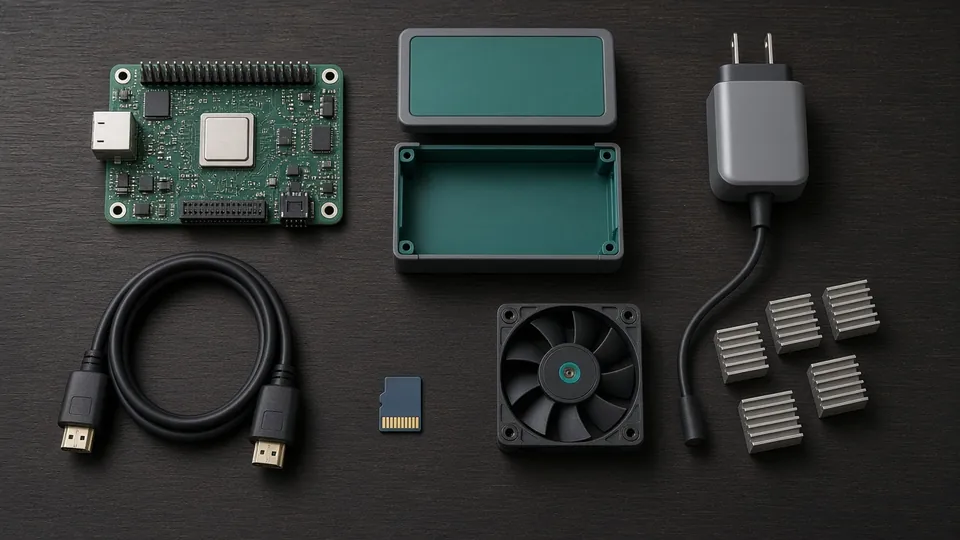
AI-generated illustration
Disclosure: This guide includes Amazon affiliate links. As an Amazon Associate we earn from qualifying purchases, at no extra cost to you.
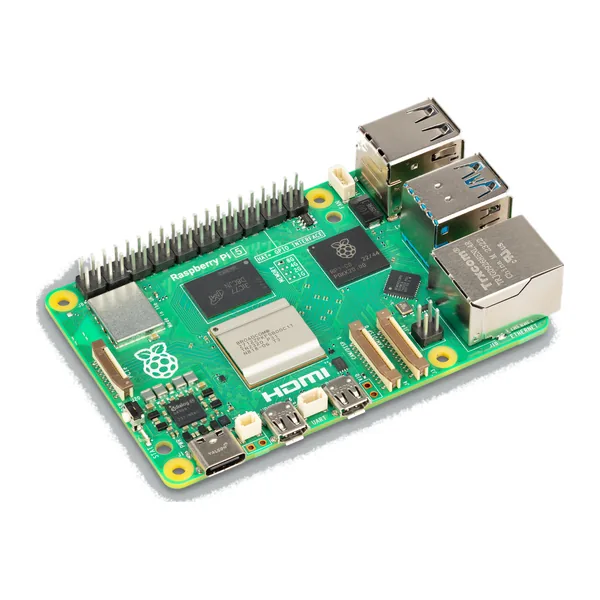
Our pick (AI and vision)
Strong value
| Model | Age | Languages | Indicative price | Highlights | Where to buy |
|---|---|---|---|---|---|
 Raspberry Pi 5 (8GB) Our pick (AI and vision) | 12+ years | Python, C++, JavaScript | See today's price | 8 GB RAM for vision & Docker • Huge maker community | |
 Raspberry Pi 5 (4GB) Strong value | 12+ years | Python, C++, JavaScript | See today's price | Faster than a Pi 4 • Board only — power, case and microSD extra |
A bare Raspberry Pi 5 board does not boot. It needs power, a microSD card, and, as soon as the project lasts, a case that moves the heat. On the Amazon.co.uk snapshot, the 4 GB board was around £160 and the 8GB board was around £231. Those are US listing snapshots, not converted dollar prices. Neither amount covers the rest of the kit: power, microSD, case, cable, and a possible camera are not in the reading. Their price is checked on the day’s listing, and this guide does not add them to the board. The buttons on this page open today’s listing.
The Raspberry Pi Foundation presents the Pi 5 as clearly faster than the Pi 4, on the order of two to three times in its own measurements. That is not a test run for this article. The processor is a Broadcom BCM2712, four Cortex-A76 cores at 2.4 GHz, with a VideoCore VII graphics processor at 800 MHz (OpenGL ES 3.1 and Vulkan 1.2). The memory is LPDDR4X, in 4GB, 8GB, or 16GB. You get two USB 3.0 ports, two USB 2.0 ports, two micro-HDMI outputs up to 4K at 60 frames per second, gigabit Ethernet, Wi-Fi 5, and Bluetooth 5.0. The 40-pin header follows the layout of the Pi 4 and Pi 3, with a PCIe 2.0 link, a power button, and a real-time clock. That clock keeps time with the power off only if you add a battery, which does not come with the board.
To place the board in the range, the Pi 3, 4, and 5 comparison and the guide which memory to choose go into the uses. A teen still hesitating between a computer and a robot that is already built should read Raspberry Pi or a robot kit.
Other shopsVoir chez SparkFun
The 4GB board is enough when the project fits in one program and a few sensors: a robot with motors, a light server such as Pi-hole, learning Python and Linux, or modest office work. Ataround £160 on 6 November 2026, it is the less expensive of the two listings in the reading. It gets tight as soon as a browser, a development environment, and a camera run together. A console for old games is not an automatic argument: the distribution has to announce Pi 5 support. That is not true of every image built for the Pi 4.
Other shopsVoir chez SparkFun
The 8GB board is the one you take for a camera, a small computer-vision model, or a desktop with several programs open. The gap with the 4GB, on the two listings of 6 November 2026, is around £72 (around £231 minus around £160). That is only the gap between the boards. The same accessories are added to both. Many add-on boards made for the Pi 4 still plug onto the 40 pins, but the case and the port positions have changed. A case that enclosed a Pi 4 is not reused without checking.
The 16GB version is for heavy compiling, several containers, or a larger model. It is not in the price reading for this page: check the price on the listing, and do not reuse the 8GB amount. For a first robot or a first year of Python, it is more than you need.
If the project includes a camera or several programs at once, start with the 8GB. If the budget stops at the board and motors are enough, the 4GB starts the project. In both cases, order the power supply and the microSD card at the same time, or the board stays in its bag.
The official Pi 5 power supply is a 27W USB-C unit, that is 5V at 5A, with the USB Power Delivery handshake the board expects. The Pi 5 sometimes starts on a Pi 4 supply, but the current left for the USB ports drops, and an under-voltage warning appears as soon as a disk or a camera is plugged in. The price of that 27W unit is not in the reading: check it on a power-supply listing, not on the board’s listing.
The microSD card holds the system. Aim for 64GB or 128GB, A2 class, rather than a 32GB card that fills up on the first project. A named card (SanDisk, Samsung, Kingston) avoids counterfeits that corrupt the system after a few weeks. The price is not in this reading: check it, and refuse a no-name card whose stated capacity is implausible.
The Pi 5 runs hotter than a Pi 4 as soon as the processor stays busy. A case with an active fan is the safe choice for vision or for a server that does not stop. Passive heatsinks are enough for light, intermittent use. A decorative fan does nothing more than a plain fan. Again, check the price: no case is in the reading.
To work comfortably you also need a micro-HDMI to HDMI cable. The second cable is only useful if you connect two screens. A keyboard and a mouse, USB or Bluetooth, get you through the first day. You can do without them later if the card is prepared for remote access. A card already flashed with Raspberry Pi OS saves the quarter-hour of installation, for an extra that you verify on the listing.
In robotics, the board does not drive a chassis by itself. You need a motor add-on board or a driver such as the L298N, then the project’s sensors (distance, line, an inertial unit). An official camera is worth it only if the program has to see something. An external battery is chosen from the real consumption of the build. None of these accessories has a price in the reading.
The PCIe connector is mainly for an NVMe SSD, through an adapter board made for the Pi 5. A PoE+ module powers the board over the Ethernet cable, if the switch provides PoE. A 4G or 5G modem only makes sense for an object that leaves the home network. Each of these additions has its own price to check, and none of them is deducted from the price of the board.
If the screen is far from the board, in a workshop or a rack, an HDMI extender replaces a long, fragile active cable. AV Access sells this kind of gear (avaccess.com). No promo code was verified for this program (Awin, homepage of 5 November 2026).
A kit a reseller calls “complete” in principle brings together a board, a compatible power supply, a microSD card, and a case. The advantage is one order and parts that are supposed to fit. The drawback is paying for parts you already own, or a case with no fan when your project needs one. No all-in-one kit is in the reading of 6 November 2026. The listings linked from the buttons on this page are the boards alone. For a kit, check the price of an offer whose title really lists the power supply, the microSD card, and the case.
Buying the parts one by one lets you skip the keyboard if the house already has one, and lets you choose a ventilated case. You then have to check Pi 5 compatibility for each part, and accept several parcels. That is the clearest path while the reading covers only the boards.
Around a 4GB board at around £160 plan on the 27W supply, a 64GB microSD card, a ventilated case, and a micro-HDMI cable. The total is not calculated here, because only the board price is in the reading.
Around an 8GB board at around £231 the same base (power, a microSD card of 128GB rather than 64GB, a ventilated case) then receives the motor board, the sensors, and, if the program has to see, a camera. A battery is added only for a robot that leaves the wall outlet. Each of those lines is priced separately.
The same 8GB board, the same base, plus a keyboard and a mouse if you do not have them. A higher-resolution camera and a lens are only for an image project. They are not part of the minimum for learning Python.
These steps assume a microSD card, a computer to prepare it, then a screen, a keyboard, and a mouse for the first desktop. Allow a quarter of an hour to write the card, the time of the first boot, then a few minutes of updates. This path was not replayed on a Pi 5 for the present update: the labels follow Raspberry Pi Imager as it appears in the versions that ask you to customize before writing.
In a terminal:
sudo apt update && sudo apt full-upgrade -yThe command finishes with no error message. If the kernel was updated, reboot, then check that the desktop comes back and that Wi-Fi is still there.
The program below uses gpiozero, which is present on Raspberry Pi OS, and BCM numbering. BCM pin 17 is physical pin 11. A nearby ground, for example physical pin 6 or 9, closes the circuit. Put a resistor in series with the LED, commonly 330 ohms for a standard LED: connecting it bare to a pin can damage it. This fragment follows the usual gpiozero example. It was not run on a Pi 5 for this article.
from gpiozero import LED
from time import sleep

led = LED(17)

while True:
    led.on()
    sleep(1)
    led.off()
    sleep(1)
Run it from Thonny. The LED should change state every second. Ctrl+C in the terminal, or Thonny’s stop button, stops the loop. Older RPi.GPIO examples targeted earlier boards. On the Pi 5, the input-output controller has changed, and that library is no longer the path described by the current documentation.
Up-to-date documentation is on raspberrypi.com. The MagPi magazine (magpi.cc) publishes projects as PDFs. On the French-language side, Framboise 314 (framboise314.fr) relays tutorials. Books exist in bookstores. No specific edition is in the reading, so this page does not put a buy button on a title, and still less on the board’s listing.
Two builds on this site start from this base: the presence detector and the BME280 weather station. They assume the board is already booted, not merely ordered.
If you are buying a new board, the Pi 5 is the one that still has margin for a camera or several programs. The gain announced by the Foundation is real on paper, but the extra cost always includes the 27W supply: a Pi 4 unit does not complete the order. If a Pi 4 is already running at home, replacing it is justified only when memory or the processor limits the project.
It often boots the board, then shows its limits as soon as a USB port draws current. The unit meant for the Pi 5 is the official 27W supply, or a quality USB-C charger that really negotiates 5V and 5A. Check the price: it is not in the reading.
The 4GB, at around £160 on 6 November 2026, is enough for motors and sensors with no image processing. As soon as a camera or a detection model enters the project, the 8GB at around £231 saves you buying the board again six months later. Power, the microSD card, and the case are still added in both cases.
Not permanently. A screen, a keyboard, and a mouse serve the first day. After that, SSH gives a remote terminal, and a remote desktop shows the interface on the computer at home. Tick SSH in Imager before you write the card, or the first contact still happens on a screen.
The GPIO pins are the board’s general-purpose inputs and outputs: you connect an LED, a button, or, more often, an add-on board that drives motors. I2C is a two-wire bus, SDA and SCL, that lets several sensors share the same pins. The BME280 station connects that way.
For the web, code, and light office work, yes, as long as you have the power supply, the microSD card, and a way to display the image. For a recent game or heavy video editing, no. And without the accessories, the board alone is not a workstation yet.
The useful order, on the day you place it, is therefore the board that matches the project, 4GB at around £160 or 8GB at around £231 in the reading of 6 November 2026, plus a 27W supply, an A2 microSD card, and a ventilated case whose prices are read on their own listings.
Torn between two models or stuck on a build? Drop us a line and we will get back to you by email.